Last Updated on October 8, 2026
Flashlights are essential tools for emergencies, outdoor adventures, and everyday tasks. But what happens when your flashlight grows dim? You switch it on expecting a bright beam, only to find that the light is much weaker than usual.
Many people assume the flashlight is worn out and needs replacing. However, dimming often comes from something simple, such as a weak battery, dirty contacts, or a loose connection.
Sometimes, the flashlight is working exactly as designed. Modern LED models may reduce brightness automatically to prevent overheating or protect a low battery.
In this guide, we’ll explain why a flashlight loses brightness, how to identify the cause, and what you can safely do to restore normal performance.
Why Does My Flashlight Grow Dim?
A flashlight losing brightness isn’t necessarily broken. The cause often depends on when and how the light becomes dim.
If the brightness gradually fades over several hours, the battery may be running low. If it suddenly drops after a few minutes on high mode, the flashlight could be controlling its temperature.
Let’s look at the most common causes.
1. Weak or Depleted Batteries

A low battery is one of the first things to check when your flashlight grows dim.
Disposable batteries lose power as they are used. Rechargeable batteries also gradually lose capacity as they age, which can reduce runtime and performance.
Common signs:
- The flashlight becomes dimmer during use.
- High mode no longer appears as bright as before.
- The light works briefly and then shuts off.
- The flashlight performs normally after replacing or charging the battery.
Fix: Replace disposable batteries with a fresh matching set or fully charge the approved rechargeable battery.
Always follow the manufacturer’s battery requirements. Different battery chemistries may have different voltages, even when the cells are similar in size. Our flashlight battery types guide explains the differences between alkaline, lithium, and rechargeable cells.
2. Loose or Corroded Battery Contacts
The metal contacts inside your flashlight carry electricity from the battery to the light.
If these contacts become dirty, corroded, or loose, they may create resistance that reduces performance or causes flickering.
Fix: Turn off the flashlight and remove user-replaceable batteries.
Check accessible springs and contact surfaces for dirt, corrosion, or damage. Use a soft, dry brush or cloth to remove loose debris.
For suitable exposed metal contacts, a cotton swab lightly moistened with isopropyl alcohol may help. Allow the contacts to dry completely before reinstalling the batteries.
If the battery has leaked or swollen, don’t force it out. Damaged batteries require careful handling.
3. LED or Bulb Problems
LED flashlights generally last much longer than older incandescent models. However, LEDs and their electronic drivers can still develop problems.
If your flashlight remains unusually dim after installing a known-good battery and cleaning the contacts, an internal fault becomes more likely.
Fix: If your flashlight uses a user-replaceable incandescent bulb, check for a compatible replacement.
Modern LED flashlights often have integrated components that aren’t designed for home replacement. Contact the manufacturer if you suspect an LED or driver failure.
If you’re unsure which component could be responsible, our guide to the main parts of a flashlight explains how the LED, reflector, battery contacts, and other components work together.
4. Loose or Damaged Internal Connections
Some flashlights use internal wires, while others rely on springs, metal contacts, and circuit boards.
A hard drop, corrosion, or a loose connection may interrupt the power supply and cause reduced brightness.
Fix: Inspect accessible battery contacts and removable caps first.
If the problem appears to involve sealed wiring or circuit-board components, professional repair is usually safer than opening the entire flashlight.
5. Faulty Power Switch
A worn or dirty switch can cause flickering, intermittent power, or poor electrical contact.
You might notice that the light becomes brighter when you press the switch harder or adjust the tail cap.
Fix: Check for visible dirt or damage around the switch. Clean the exterior gently with a soft brush.
Don’t spray ordinary lubricants or cleaning fluids directly inside the switch. If the mechanism is defective, a compatible replacement may be necessary.
For more detailed troubleshooting, see our guide to fixing a push-button flashlight. It covers switch testing, electrical contacts, and when replacement is necessary.
6. Automatic Thermal Regulation
This is one of the most commonly misunderstood reasons for flashlight dimming.
Many powerful LED flashlights generate considerable heat on their highest brightness setting. To protect the LED, battery, and electronics, the flashlight may automatically reduce its output.
For example, a flashlight advertised at 2,000 lumens may provide that output only for a limited period before stepping down to a lower level.
How to check:
- The flashlight starts at normal brightness.
- Its output decreases after several minutes on High or Turbo.
- The body becomes warm during use.
- Brightness may return after the flashlight cools, depending on the model.
This behavior is often normal. Check your flashlight’s manual for thermal regulation or step-down information.
7. Low-Voltage Protection
Some rechargeable LED flashlights automatically reduce output when battery voltage becomes low.
This helps conserve remaining power and may prevent the battery from becoming excessively discharged.
Fix: Charge the battery using the approved charger. If the battery no longer holds sufficient charge, replace it with a compatible one.
Don’t bypass electronic battery protection or substitute an unapproved battery.
How to Fix a Flashlight That Has Become Dim
Before buying replacement parts, follow these simple troubleshooting steps.
- Check the brightness setting. Make sure the flashlight isn’t in Low, Eco, or Moonlight mode.
- Replace or charge the battery. Use the exact battery type approved for your model.
- Inspect the battery contacts. Look for dirt, corrosion, damaged springs, or loose connections.
- Clean the lens. Dirt, grease, and fingerprints can reduce the amount of usable light.
- Check the tail cap. Make sure removable caps are properly seated without over-tightening them.
- Allow the flashlight to cool. If dimming happens after extended high-output use, thermal regulation may be responsible.
- Test again. If brightness remains unusually low, check the manufacturer’s troubleshooting instructions.
If the flashlight still performs poorly with a known-good battery and clean connections, the switch, LED driver, or another internal component may need service.
How to Clean Your Flashlight Safely
Dust, grime, and moisture can affect flashlight performance. Regular cleaning helps protect the electrical connections and keeps the lens clear.
Start by turning off the flashlight and disconnecting any charging cable.
- Remove the batteries if the compartment is user-accessible.
- Wipe the outside with a soft microfiber cloth.
- Clean the lens gently with a suitable lens cloth.
- Remove loose dirt from accessible contacts using a soft brush.
- Inspect removable O-rings and seals for damage.
- Allow everything to dry before reassembly.
Avoid spraying liquids into switches, charging ports, or sealed electronic assemblies.
Other Common Flashlight Problems
Dimming isn’t the only issue that flashlight owners encounter. Some related problems can help reveal what’s going wrong.
Flashlight Doesn’t Turn On
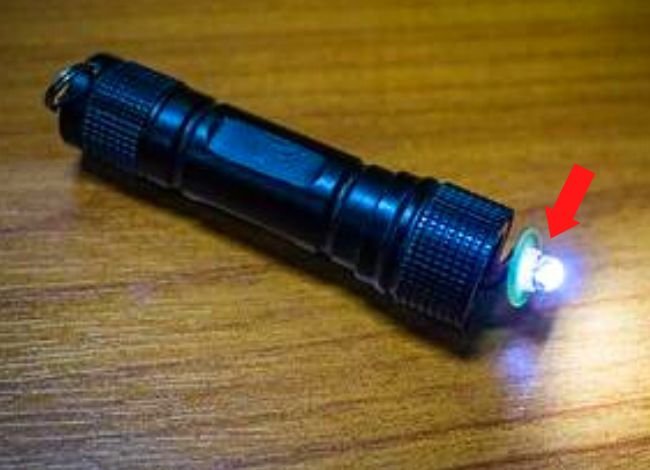
If your flashlight produces no light at all, start with the battery.
Check its charge, polarity, and condition. Then inspect the battery compartment and accessible electrical contacts.
If these checks don’t help, the switch or internal electronics may be faulty.
Flashlight Flickers Intermittently
Flickering often points to an unreliable electrical connection, though some electronic faults can produce similar symptoms.
What to check:
- Loose battery or battery holder
- Dirty contacts
- Improperly tightened tail cap
- Worn power switch
- Damaged internal connections
Start with the accessible components before considering internal repair.
If you have a Coast flashlight and replacing the battery hasn’t helped, our Coast flashlight troubleshooting guide covers battery contacts, charging problems, and switch failures in more detail.
Water Inside the Flashlight
Even water-resistant flashlights have limits. Damaged seals, loose caps, or exposure beyond the rated conditions can allow moisture inside.
If this happens, turn off the flashlight and disconnect charging power. Remove user-replaceable batteries if it is safe to do so.
Don’t charge or operate the flashlight if water has reached the battery or internal electronics. Contact the manufacturer for repair guidance.
Switch Failure
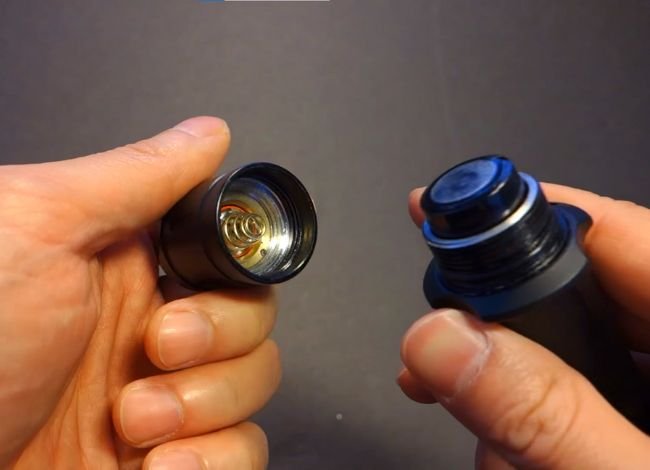
Mechanical switches can wear out, while electronic switches may fail because of moisture or circuitry problems.
Inspect the visible button area for dirt or damage. If the switch isn’t user-serviceable, avoid prying it open.
A replacement tail-cap or switch assembly may be available for some models.
Damaged O-Rings
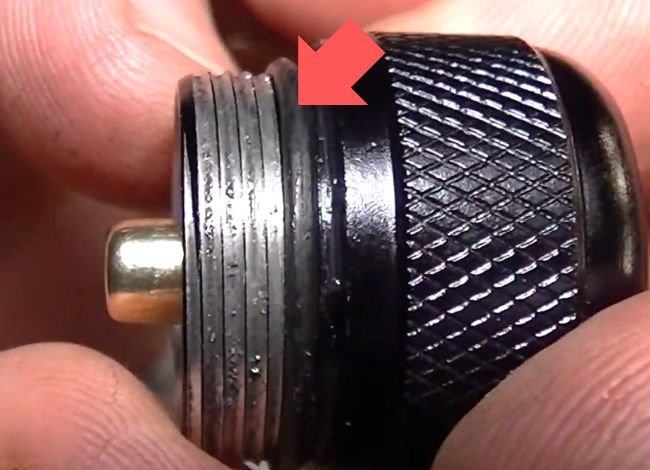
O-rings help seal removable flashlight components against moisture and dust.
If they’re cracked, flattened, or missing, water may enter the flashlight and damage its electrical connections.
Replace worn O-rings with the correct size and material. Use a small amount of manufacturer-approved silicone lubricant when recommended.
How to Prevent Your Flashlight From Growing Dim
Good maintenance can prevent many problems that lead to weak light output.
1. Use the Correct Batteries
Choose quality batteries that match the flashlight’s specifications.
Don’t assume a rechargeable lithium-ion battery can replace an alkaline battery simply because both fit inside the compartment.
For flashlights that use multiple disposable cells, replace the entire set together.
2. Keep the Contacts and Lens Clean
Dust and corrosion can affect the electrical connection, while a dirty lens can make the beam appear weaker.
Clean accessible contacts when needed and wipe the lens with a soft cloth.
3. Store Your Flashlight Properly
Keep the flashlight in a cool, dry place away from excessive heat.
Remove disposable batteries before long-term storage to reduce the risk of leakage.
Follow the manufacturer’s storage recommendations for rechargeable batteries.
4. Avoid Unnecessary High-Output Use
Turbo mode is useful when you need maximum brightness, but it consumes more energy and produces more heat.
For close-range work, Medium or Low mode may provide enough light while extending runtime.
5. Inspect the Flashlight Periodically
If you keep a flashlight in your vehicle or emergency kit, test it occasionally.
Check that the battery is healthy, the contacts are clean, and the switch works normally.
When Should You Replace Your Flashlight?
Minor dimming problems don’t usually require a new flashlight. However, replacement may make sense when:
- The LED driver or circuit board is badly damaged.
- Water has caused serious internal corrosion.
- Replacement parts aren’t available.
- The flashlight has a damaged battery compartment.
- Professional repair costs almost as much as a replacement.
Before replacing an expensive flashlight, check whether the manufacturer offers warranty service or compatible replacement parts.
Choosing a Flashlight With Consistent Brightness
If you’re considering a new flashlight, don’t judge performance by maximum lumens alone.
A flashlight advertised at 3,000 lumens may not maintain that output for its entire runtime. Some models reduce brightness within minutes to manage heat and battery consumption.
When comparing models, look for:
- Runtime at different brightness settings
- Brightness regulation and step-down behavior
- Battery capacity and charging method
- Beam distance and useful spill light
- Water and impact resistance
- Available warranty support
Models such as the Fenix PD36R, Streamlight ProTac HL-X, Olight Warrior 3S, and ThruNite TC15 offer different combinations of output, battery systems, and operating modes.
However, none should be assumed to maintain its maximum advertised brightness indefinitely. Check the exact model version and manufacturer’s runtime specifications before buying.
Beam shape also affects how bright a flashlight appears in everyday use. Our flashlight flood vs. throw guide explains why a focused beam can look brighter at a distance even when another flashlight produces more total lumens.
Frequently Asked Questions About Flashlight Dimming
Why does my flashlight grow dim even with new batteries?
Dirty contacts, a loose connection, incorrect brightness settings, or thermal regulation may be responsible. Check battery compatibility and inspect accessible electrical contacts first.
Can I fix a dim flashlight myself?
Often, yes. Replacing weak batteries, cleaning accessible contacts, or wiping the lens can help. Internal LED, driver, or sealed switch repairs may require professional service.
Are rechargeable batteries better for flashlights?
Rechargeable batteries can be convenient and economical for frequent use. However, they must be compatible with the flashlight’s voltage and charging requirements. Disposable batteries may be useful for emergency storage.
Why does my flashlight become dim after a few minutes?
Many high-output LED flashlights reduce brightness automatically as they heat up. This is called thermal regulation or step-down. Check your model’s manual to determine whether the behavior is normal.
What causes flashlight flickering?
Loose contacts, weak batteries, damaged switches, and internal electrical faults can all cause flickering. Start by testing with a known-good battery.
Can water damage a waterproof flashlight?
Yes. Water resistance is limited by the flashlight’s IP rating and the condition of its seals. Cracked O-rings or loose covers can allow moisture inside.
Does a dim flashlight mean the LED is failing?
Not necessarily. Low battery power, poor contact, brightness regulation, or a dirty lens are often more likely explanations. An LED or driver fault becomes more likely if other causes have been ruled out.
Final Thoughts: What to Do When Your Flashlight Grows Dim
When your flashlight grows dim, there’s no need to replace it immediately.
Start with the batteries, brightness settings, contacts, and lens. These simple checks can often explain why the beam is weaker than normal.
Also, remember that many modern LED flashlights automatically reduce brightness to manage heat or low battery voltage. That doesn’t always mean something is broken.
If the flashlight remains unusually dim after basic troubleshooting, consult the manufacturer’s instructions or ask about professional repair.
With regular maintenance, compatible batteries, and proper storage, your flashlight can remain a reliable source of light for years.