Last Updated on October 18, 2026
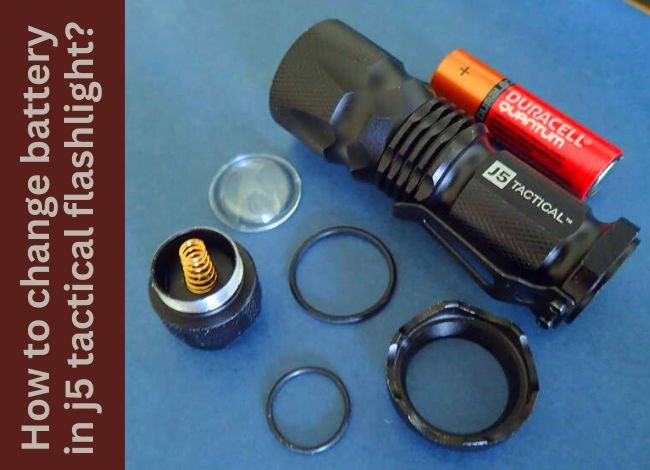
If you’re wondering how to change battery in J5 Tactical flashlight, you’re not alone. Whether you use it for camping, emergencies, or everyday carry, the J5 Tactical flashlight is known for its compact design, adjustable beam, and convenient operation.
However, like any battery-powered flashlight, its performance eventually declines as the battery runs low. You may notice dimming, flickering, or a light that refuses to turn on.
Fortunately, replacing the battery is simple and usually takes less than a minute. The important part is choosing the correct battery, installing it in the right direction, and avoiding incompatible replacements.
In this guide, we’ll explain how to replace the battery in your J5 Tactical flashlight, identify compatible AA and 14500 batteries, and troubleshoot common problems. We’ll also cover battery maintenance and safe charging practices.
Important: These instructions primarily apply to the popular J5 Tactical V1 Pro. Other J5 models may have different battery requirements, so always check your specific flashlight before installing a replacement.
What Battery Does the J5 Tactical Flashlight Use?
The J5 Tactical V1 Pro supports two battery options:
- One AA alkaline battery (1.5V): A convenient, widely available option for everyday use.
- One 14500 rechargeable lithium-ion battery (typically 3.6V or 3.7V nominal): An alternative for owners who prefer rechargeable power.
J5 Tactical confirms compatibility with both battery types for the V1 Pro. However, you should use only one battery at a time.
These batteries look similar, but their electrical characteristics are different. A 14500 lithium-ion battery operates at a substantially higher voltage than a standard AA alkaline battery.
Although the V1 Pro supports both options, this doesn’t mean every flashlight that uses AA batteries can safely use a 14500 cell.
For more details, read our guide to flashlight battery types and compatibility.
AA vs. 14500 Battery: What’s the Difference?
| Feature | AA Alkaline | 14500 Lithium-Ion |
|---|---|---|
| Nominal voltage | 1.5V | 3.6V–3.7V |
| Rechargeable | No | Yes |
| Convenience | Easy to replace | Can be reused after charging |
| Charging equipment | Not applicable | Compatible lithium-ion charger required |
| Upfront cost | Usually lower | Usually higher |
| Best for | Occasional or emergency use | Frequent use when approved by the manufacturer |
The rechargeable battery may provide different brightness and runtime characteristics. However, actual performance depends on the flashlight’s electronics, operating mode, and battery capacity.
Don’t assume the higher-voltage battery will always provide a longer runtime.
How to Change Battery in J5 Tactical Flashlight: Step-by-Step Instructions
Changing the battery in a J5 Tactical V1 Pro doesn’t require special tools. Follow these steps to replace it safely.
Step 1: Turn Off the Flashlight
Before opening the battery compartment, make sure the flashlight is switched off.
Press the tail-cap switch to turn off the light and allow it to cool if it has been running for an extended period.
This prevents accidental activation while you’re handling the battery.
Step 2: Unscrew the Tail Cap
The battery compartment is accessed through the rear of the flashlight.
- Hold the flashlight body firmly.
- Locate the tail cap containing the power switch.
- Turn the tail cap counterclockwise.
- Continue turning until it separates from the flashlight body.
Most J5 V1 Pro flashlights can be opened by hand. If the cap is tight, use a soft cloth or rubber grip to improve your hold.
Tip: Avoid using metal pliers unless professional service is necessary. They can scratch the finish or damage the threads.
Step 3: Remove the Old Battery
Once the tail cap is removed, carefully tilt the flashlight to slide out the existing battery.
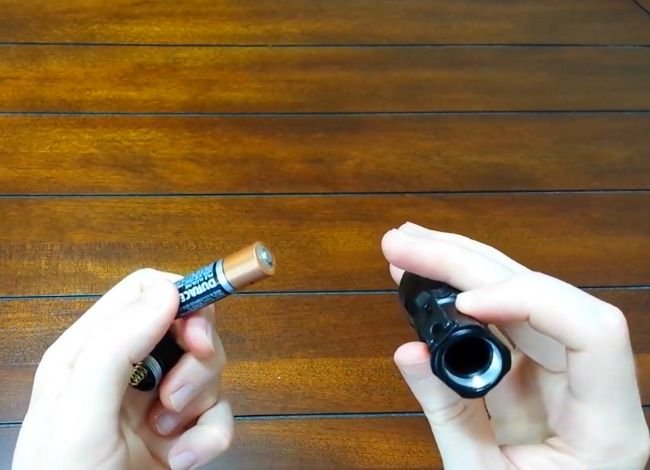
Inspect the battery for:
- White or greenish corrosion deposits.
- Swelling or deformation.
- Leaking electrolyte.
- Torn or damaged battery wrapping.
- Unusual discoloration or heat damage.
If the battery is swollen, leaking, or stuck, don’t puncture or force it out.
Damaged batteries should be handled and disposed of according to local battery-recycling or hazardous-waste requirements.
Step 4: Insert the New Battery
Select a compatible AA battery or a manufacturer-supported 14500 rechargeable battery.
For the J5 Tactical V1 Pro, install the battery with the positive (+) terminal facing the flashlight head and the negative (−) terminal toward the tail cap.
Slide the battery into the compartment without forcing it.
Important: Never install two batteries together or attempt to use a battery that doesn’t fit correctly.
Step 5: Secure the Tail Cap
After installing the battery:
- Align the tail-cap threads with the flashlight body.
- Turn the cap clockwise.
- Tighten it until securely seated.
- Avoid overtightening or cross-threading.
A properly fitted tail cap helps maintain reliable electrical contact and supports the flashlight’s designed water resistance.
Step 6: Test the Flashlight
Press the tail switch to turn the flashlight on.
The J5 V1 Pro has three operating modes:
- High: Maximum brightness.
- Low: Reduced output for conserving battery power.
- Strobe: Flashing light for attention-getting or emergency signaling.
Use the tail switch to cycle through the available modes.
You can also slide the flashlight head forward or backward to adjust the beam between wider and narrower illumination.
If the light turns on and operates normally, the battery replacement is complete.
Step 7: Recharge the Battery if Necessary
If you’re using a 14500 lithium-ion battery, check its remaining charge.
The J5 V1 Pro doesn’t include an integrated USB charging port. A rechargeable 14500 battery must be charged separately using equipment appropriate for that specific cell.
Never place an ordinary AA alkaline battery in a charger.
How to Charge a 14500 Battery for a J5 Tactical Flashlight
If your J5 Tactical flashlight uses a rechargeable 14500 lithium-ion battery, proper charging is essential for safe operation.
- Turn off the flashlight and remove the battery.
- Inspect the battery for visible damage.
- Place it in a compatible lithium-ion charger, following the correct polarity.
- Connect the charger to its recommended power source.
- Monitor the charger’s indicator according to its instructions.
- Remove the battery once charging is complete.
A conventional 14500 lithium-ion cell typically charges to 4.2V. Use a charger designed for its chemistry and charging specifications.
Do not use an ordinary AA NiMH charger for a lithium-ion battery unless the charger explicitly supports that chemistry.
Some 14500 batteries include a built-in USB charging port. If yours does, follow the battery manufacturer’s specific charging instructions.
Important Safety Tips for 14500 Lithium-Ion Batteries
Lithium-ion batteries offer convenient rechargeable power, but they require different handling from disposable AA batteries.
1. Avoid Deep Discharge
Repeatedly draining lithium-ion batteries to very low voltage can reduce their usable lifespan.
Recharge the battery when performance begins to decline rather than deliberately running it completely flat.
Don’t attempt to revive a severely over-discharged or damaged cell using improvised charging methods.
2. Charge When Necessary
It’s not necessary to fully recharge a lithium-ion battery after every brief use.
However, you shouldn’t leave it completely discharged for extended periods. Follow the battery manufacturer’s charging and storage recommendations.
3. Use a Compatible Charger
Choose a reputable charger that supports 14500 lithium-ion batteries.
An unsuitable charger may provide the wrong charging voltage or current, increasing the risk of overheating and battery damage.
4. Keep Batteries Dry
Never charge a wet battery or place a damp lithium-ion cell into a charger.
If the flashlight has been exposed to rain, dry the exterior before opening the battery compartment.
5. Store Batteries Safely
Keep spare batteries in a protective case, away from keys, coins, or other metal objects.
For extended storage, maintain a moderate charge level and keep the battery in a cool, dry location.
6. Avoid Damaged Batteries
Stop using a rechargeable battery if you notice swelling, torn insulation, overheating, leakage, or other physical damage.
Never puncture, crush, or disassemble a lithium-ion cell.
Why Choose a 14500 Battery for the J5 Tactical V1 Pro?
A 14500 rechargeable battery can be convenient for owners who use their flashlight frequently.
Instead of purchasing disposable batteries repeatedly, you can recharge a compatible cell many times during its service life.
Potential advantages include:
- Rechargeability: Reduces repeated purchases of disposable batteries.
- Compact size: Similar physical dimensions to a standard AA battery.
- Higher nominal voltage: Supports the electrical requirements of specifically compatible flashlight designs.
- Convenient replacement: A charged spare can be useful during extended activities.
- Reduced battery waste: Repeated reuse may reduce the number of disposable batteries consumed.
However, these benefits come with the need for a suitable charger and careful handling.
If you only use your J5 flashlight occasionally, a standard AA battery may be the simpler option.
J5 Tactical Flashlight Not Working After Battery Replacement?
If your flashlight doesn’t turn on after installing a fresh battery, don’t assume the LED has failed.
Start by checking the following common problems.
| Problem | Possible Cause | Recommended Fix |
|---|---|---|
| Flashlight won’t turn on | Dead battery or incorrect polarity | Check battery orientation and try a known-good replacement |
| Light flickers | Loose tail cap or dirty contacts | Secure the cap and clean accessible contacts |
| Light appears dim | Weak battery or dirty lens | Replace or recharge the battery and clean the lens |
| Modes don’t change | Switch operation or switch fault | Try the correct switch sequence and inspect the tail switch |
| Battery won’t fit | Incorrect cell dimensions or incompatible battery | Check the exact battery specifications; never force insertion |
| Battery drains quickly | Aging battery or frequent high-mode use | Try low mode and assess battery condition |
Check the Tail-Cap Contacts
Sometimes the flashlight doesn’t work because the battery spring or metal contact is dirty.
Turn off the flashlight, remove the battery, and inspect accessible contacts.
Use a dry cloth or a cotton swab lightly dampened with isopropyl alcohol to remove dirt. Allow the contacts to dry before reinstalling the battery.
If the battery has leaked, handle it carefully and avoid touching the residue with bare hands.
For more information about electrical contacts, switches, and the LED assembly, read our guide explaining the main components inside a flashlight.
How to Maintain Your J5 Tactical Flashlight Battery
Good battery maintenance can help reduce performance problems and keep your flashlight ready for use.
- Check battery condition: Inspect for leakage, corrosion, or damage periodically.
- Keep contacts clean: Remove dirt from accessible electrical connections.
- Store the flashlight properly: Avoid high humidity and excessive heat.
- Remove batteries during long-term storage: Particularly important for disposable alkaline cells.
- Clean the lens: Use a microfiber cloth to remove fingerprints and dust.
- Protect rechargeable cells: Store spare lithium-ion batteries in suitable cases.
- Use the correct charger: Follow the charging specifications of the battery manufacturer.
Regular maintenance can prevent many common problems and reduce the need for unnecessary replacements.
J5 Tactical V1 Pro Battery and Flashlight Features
The J5 Tactical V1 Pro remains a compact option for household tasks, camping, walking, and emergency kits.
According to the manufacturer’s product description, key features include:
- Operation using one AA battery or one compatible 14500 rechargeable battery.
- Three lighting modes: High, Low, and Strobe.
- Adjustable wide-to-narrow beam focus.
- Compact construction suitable for carrying in a pocket or bag.
- Water-resistant construction for ordinary outdoor exposure.
- Manufacturer-advertised beam reach of up to approximately 600 feet.
The official J5 Tactical V1 Pro product page confirms its AA and 14500 battery compatibility.
As of 2026, the V1 Pro is listed as sold out on J5 Tactical’s official online store. Owners can still use this guide to maintain an existing flashlight.
Frequently Asked Questions About Changing a J5 Tactical Flashlight Battery
1. What type of battery does the J5 Tactical flashlight use?
The J5 Tactical V1 Pro supports one AA battery or one compatible 14500 rechargeable lithium-ion battery. Other J5 models may have different battery requirements, so check your specific model before purchasing a replacement.
2. How do I know when it’s time to replace the battery?
Common signs include dimming, flickering, reduced runtime, or the flashlight failing to turn on. Check the battery before assuming an internal component has failed.
3. Can I use a rechargeable battery in my J5 Tactical flashlight?
Yes, the J5 Tactical V1 Pro supports a compatible 14500 rechargeable lithium-ion battery. However, not every J5 flashlight necessarily supports the same battery chemistry or voltage.
4. How do I change the battery in a J5 Tactical flashlight?
Turn the flashlight off, unscrew the tail cap counterclockwise, remove the old battery, and insert a compatible replacement with the positive terminal facing the flashlight head. Reattach the tail cap and test the flashlight.
5. My J5 flashlight still won’t work after replacing the battery. What should I do?
Check the battery orientation, make sure the tail cap is secure, and inspect accessible contacts for dirt or corrosion. Test with a known-good compatible battery. If the light remains unresponsive, the switch or internal electronics may need attention.
6. How long does a battery last in a J5 Tactical flashlight?
Runtime depends on the battery type, capacity, and selected lighting mode. High mode generally drains the battery faster than low mode. The manufacturer doesn’t provide one universal runtime that applies to every J5 Tactical model and battery combination.
7. Is it safe to store the J5 flashlight with the battery inside?
For short-term storage, follow the manufacturer’s recommendations. For extended storage, removing disposable alkaline batteries can reduce the risk of leakage. Rechargeable lithium-ion batteries should be stored at an appropriate charge level in a cool, dry place.
Final Thoughts
Knowing how to change battery in J5 Tactical flashlight is useful for keeping your flashlight ready for everyday tasks, outdoor activities, and emergencies.
The J5 Tactical V1 Pro makes battery replacement straightforward. Simply remove the tail cap, take out the old battery, insert a compatible AA or 14500 cell with the correct polarity, and close the compartment securely.
The most important thing is using the correct battery. Although the V1 Pro supports both AA and 14500 cells, their voltages are different, and that compatibility shouldn’t be assumed for other flashlight models.
With proper battery care, safe charging practices, and occasional cleaning, your J5 Tactical flashlight can continue providing reliable illumination whenever you need it.
If you’re comparing replacements or looking for a different flashlight, explore our flashlight buying guide for additional advice on battery types, brightness, beam distance, and durability.
I’ve had my for a few years but even though I’ve changed the batteries using different AA alkaline ones nothing works and I’ve lost the information to the manufacturer
so do I have any alternatives for getting my flashlight operable again???
If you have already tried different new AA alkaline batteries and the flashlight still does not work, I would first check the battery direction, tail cap spring, and both battery contacts for corrosion or dirt. Clean the contacts gently and make sure the tail cap is tightened fully.
If it still does not work, the problem may be the tail switch or internal driver rather than the battery. Some J5 Tactical models can also use a 14500 rechargeable battery, but only use one if your exact model supports it. If the light is a few years old and the switch/driver has failed, replacing the flashlight may be more practical than repairing it.