Last Updated on October 8, 2026
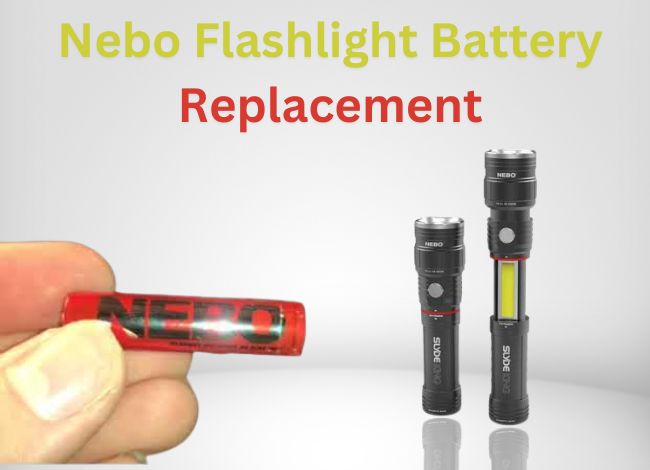
NEBO flashlights are popular among mechanics, campers, homeowners, and anyone who needs reliable lighting. Their SLYDE series is especially useful because it combines a regular flashlight with a sliding work light.
But when the batteries run low or the flashlight stops working, you need to know whether to replace the batteries or recharge the unit. That depends on which SLYDE model you own.
The original NEBO SLYDE uses four AAA alkaline batteries, while the SLYDE KING models use rechargeable lithium-ion batteries. Although these flashlights look similar, their battery systems and operating controls can be different.
In this NEBO flashlight battery replacement guide, we’ll explain how to use the SLYDE, replace its batteries, charge rechargeable models, and troubleshoot common problems.
What Makes the NEBO SLYDE Flashlight Special?
The NEBO SLYDE stands out because it provides two types of lighting in one device.
- Front LED flashlight: Produces a focused beam for walking, inspections, and general use.
- Sliding COB work light: Provides broader illumination for repairs, camping, and close-range tasks.
To reveal the COB light, you pull the flashlight’s sliding section outward.
Another useful feature is its magnetic base. You can attach the flashlight to a suitable steel surface, such as a toolbox, workbench, or vehicle body panel, for hands-free lighting.
The original SLYDE 6156 delivers up to 250 lumens from its front flashlight and 190 lumens from the work light.
Newer SLYDE and SLYDE KING versions may offer brighter output, adjustable focus, dimming, and additional lighting modes.
Note: Features such as red lighting and rechargeable batteries are available on certain models, not every SLYDE flashlight.
If you’re interested in its design, lighting performance, and everyday usability, our NEBO SLYDE flashlight review covers those features in more detail.
How to Operate a NEBO SLYDE Flashlight
The original NEBO SLYDE 6156 has a side-mounted button and a sliding body that reveals the work light.
Using the Original SLYDE 6156
- Turn on the flashlight. Press the side button once to activate the front LED.
- Switch to the work light. From flashlight mode, use the button sequence described in the manual to activate the COB work light.
- Use Soft Touch. A half-press without clicking lets you move between functions without fully switching the light off.
- Reveal the work light. Gently extend the sliding section to expose the COB LED panel.
- Turn the flashlight off. Use the appropriate button action for the active mode.
For newer SLYDE+ and SLYDE KING models, the work light may turn on automatically when you slide the flashlight open.
Don’t assume every version uses the same double-click or button sequence. Follow the operating instructions for your exact model.
NEBO Flashlight Battery Replacement: How to Change SLYDE Batteries
Before replacing anything, identify your flashlight model.
The original SLYDE 6156 and the SLYDE+ (2nd Gen) use four AAA batteries. Rechargeable SLYDE KING models have a different battery system and should not be treated as ordinary AAA flashlights.
| NEBO Model | Battery Type | Power Method |
|---|---|---|
| Original SLYDE 6156 | 4 AAA alkaline batteries | Replace batteries |
| SLYDE+ (2nd Gen) | 4 AAA batteries | Replace batteries |
| SLYDE KING rechargeable | Approved lithium-ion battery | Micro-USB charging |
| SLYDE KING 2K | Compatible rechargeable 18650 battery | USB-C charging |
| SLYDE KING 4K | Rechargeable battery system | USB-C charging |
Battery size alone doesn’t determine compatibility. Alkaline AAA batteries and lithium-ion rechargeable batteries can have very different voltage requirements. Our flashlight battery types guide explains these differences and what to check before buying replacements.
Step 1: Remove the Magnetic End Cap
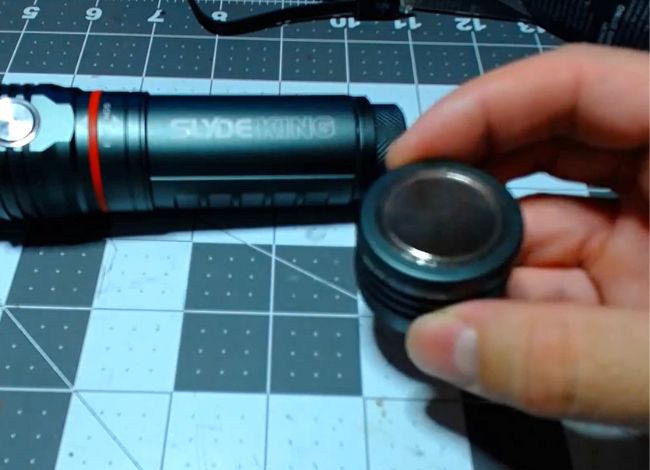
For the original SLYDE 6156, turn off the flashlight and locate the magnetic end cap at the rear.
Turn the end cap counterclockwise to remove it.
Use a firm but gentle grip. Don’t pry the magnetic base away from the flashlight or apply excessive force.
Step 2: Unscrew the Inner Battery Cap
After removing the magnetic end cap, you’ll find a second, knurled metal cap covering the battery compartment.
Turn this cap counterclockwise to open it.
Step 3: Remove the Old Batteries
Carefully remove the four AAA batteries.
Inspect the battery compartment for leakage, dirt, or corroded contacts.
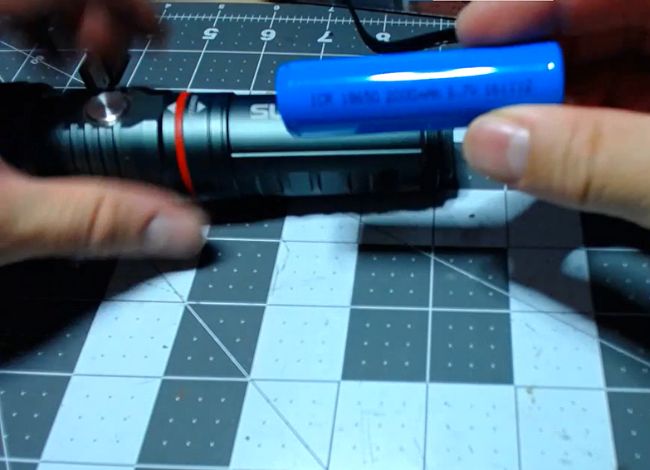
If the batteries are swollen or stuck, don’t force them out using a screwdriver or other sharp tool.
Leaking alkaline batteries can leave irritating chemical residue, so wear protective gloves if necessary.
Step 4: Insert Four New AAA Batteries
Install four fresh AAA alkaline batteries, following the polarity markings printed on the flashlight body near the base.
Replace all four batteries together. Mixing new and old batteries can cause uneven discharge and increase the risk of leakage.
Important: Don’t use unapproved lithium-ion batteries in the AAA compartment. Their voltage may differ significantly from standard AAA alkaline cells.
Step 5: Reattach Both Caps
First, reinstall the knurled battery cap by turning it clockwise.
Then reattach the magnetic end cap.
Make sure both caps are securely seated without over-tightening the threads.
Step 6: Test the Flashlight
Press the power button to check the front LED, then test the work light.
If the flashlight doesn’t turn on, recheck the battery orientation and make sure both caps are properly installed.
How to Charge a NEBO SLYDE KING Flashlight
Unlike the original AAA-powered SLYDE, rechargeable SLYDE KING models include a USB charging system.
The charging port and indicator behavior depend on the model. Older versions commonly use micro-USB, while newer models such as the SLYDE KING 2K and 4K use USB-C.
Step 1: Find the Charging Port
Look for the charging port on the flashlight body, usually protected by a rubber or silicone cover.
Open the cover carefully without tearing it.
Step 2: Connect the Correct USB Cable
Use the charging cable supplied with your flashlight or a compatible cable recommended by NEBO.
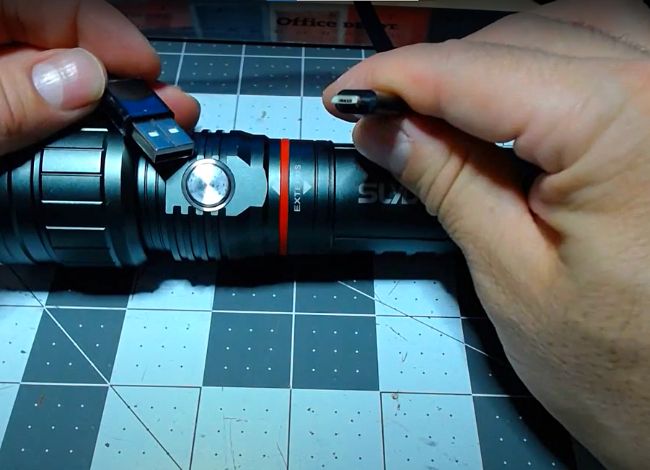
Connect the cable to the flashlight’s charging port, then connect the other end to a suitable USB power source.
Don’t attempt to connect a charging cable to an original AAA-powered SLYDE that has no charging port.
Step 3: Check the Charging Indicator
The charging indicator differs between versions.
- Older SLYDE KING 6726: The charging light remains red while charging and turns blue when fully charged.
- SLYDE KING 4K: The power button pulses green during charging and displays solid green when charged.
Always follow your own model’s manual rather than relying on an indicator color from another NEBO flashlight.
Step 4: Disconnect and Close the Charging Port
Once charging is complete, disconnect the USB cable and close the protective port cover securely.
This helps keep dust and moisture away from the connector.
How Long Does a NEBO SLYDE Take to Charge?
Charging time depends on the battery capacity, USB power supply, and specific flashlight model.
For example:
- Older rechargeable SLYDE KING: Approximately 3–4 hours.
- SLYDE KING 2K: Approximately 4–8 hours, depending on the USB power source.
- SLYDE KING 4K: As little as 4 hours with the specified power supply.
The original SLYDE 6156 doesn’t recharge through USB. Its four AAA batteries must be replaced when depleted.
Charge rechargeable models away from excessive heat and stop charging if the battery becomes swollen, damaged, or unusually hot.
What If Your NEBO SLYDE Still Doesn’t Work?
Sometimes a battery replacement or full charge doesn’t solve the problem. Before assuming the flashlight is broken, check a few common causes.
Incorrect Battery Orientation
On AAA-powered models, check the positive and negative battery markings.
Installing one battery incorrectly can prevent the flashlight from operating.
Dirty Battery Contacts
Dirt or corrosion on the metal contacts can interrupt the connection.
Remove the batteries and clean accessible contacts using a soft, dry brush. For suitable exposed contacts, a small amount of isopropyl alcohol on a cotton swab may help.
Let everything dry before reinstalling the batteries.
Charging Problems
If your rechargeable SLYDE KING isn’t charging, check the USB cable, charging port, and power source.
Try another compatible cable or USB adapter if necessary.
Don’t force the connector into the port or attempt to repair a damaged lithium-ion battery yourself.
Faulty Switch or Sliding Mechanism
If the flashlight flickers, turns off unexpectedly, or fails to activate the work light, the switch or sliding mechanism may be dirty or damaged.
Clean visible dirt from the outside and make sure the sliding section moves normally.
If your NEBO flashlight shuts off repeatedly during use, our guide on why a NEBO flashlight keeps turning off covers possible battery problems, connection faults, and other causes. Check your model’s manual before assuming it has an automatic shutoff feature.
Avoid prying open sealed switch components. Contact NEBO support if basic troubleshooting doesn’t help.
NEBO SLYDE Maintenance Tips
Proper maintenance can help keep your flashlight working reliably for years.
- Keep it clean: Wipe dust, grease, and fingerprints from the flashlight body and lens.
- Check the sliding mechanism: Remove visible dirt without forcing the moving sections.
- Inspect battery contacts: Look for corrosion whenever you replace batteries.
- Remove AAA batteries during long-term storage: This reduces the risk of alkaline leakage.
- Use approved batteries: Follow the requirements for your exact model.
- Protect the charging port: Keep its cover closed when not charging.
- Avoid excessive heat: Don’t leave the flashlight in direct sunlight or a hot vehicle for extended periods.
- Check water-resistance ratings: Different SLYDE models offer different levels of protection.
If you own a rechargeable SLYDE KING, don’t leave it fully discharged for long periods. Follow NEBO’s recommendations for charging and storage.
If you need to inspect components beyond the removable battery compartment, our NEBO flashlight disassembly guide explains common flashlight components and maintenance considerations. Only open parts your specific model is designed to let users service; don’t force sealed electronics or switch assemblies apart.
Frequently Asked Questions About NEBO SLYDE Flashlights
What batteries does the original NEBO SLYDE use?
The original SLYDE 6156 uses four AAA alkaline batteries. The batteries are accessible by removing the magnetic end cap and inner knurled battery cap.
Can I recharge a regular NEBO SLYDE flashlight?
Not if it’s the original AAA-powered model. It doesn’t have a built-in USB charging system. Rechargeable SLYDE KING models use a separate battery and charging arrangement.
Can I replace the battery in a NEBO SLYDE KING?
Replacement depends on the exact model. Some SLYDE KING versions use a compatible removable rechargeable battery, while others have different battery arrangements. Check the model number and obtain an approved replacement from NEBO.
Is the NEBO SLYDE waterproof?
Water resistance depends on the model. For example, the SLYDE+ (2nd Gen) is rated IPX4, meaning it resists water splashes. Other SLYDE KING versions have different ratings. Don’t submerge your flashlight unless the manufacturer specifically permits it.
Can I use the flashlight while charging?
This depends on the model. Unless the manufacturer explicitly supports operation during charging, switch it off and allow it to charge normally.
Why won’t my NEBO SLYDE turn on with new batteries?
Check battery polarity, contact cleanliness, and whether the battery caps are fully installed. If the light remains unresponsive, the switch or internal electronics may be faulty.
Does the NEBO SLYDE have a zoom feature?
The original SLYDE 6156 provides a front LED flashlight and sliding COB work light. Some rechargeable SLYDE KING models also offer adjustable zoom, but the feature isn’t universal across the series.
Final Thoughts on NEBO Flashlight Battery Replacement
The NEBO SLYDE is a practical lighting tool for repairs, camping, household work, and emergencies. Its sliding COB work light and magnetic base make it especially useful when you need hands-free illumination.
However, successful NEBO flashlight battery replacement starts with identifying the correct model.
For the original SLYDE 6156, remove the magnetic end cap and inner battery cap, then replace all four AAA batteries. For rechargeable SLYDE KING models, use the correct USB charging method and manufacturer-approved battery.
Never assume that AAA-powered and lithium-ion rechargeable models use interchangeable batteries.
With proper battery care, regular cleaning, and the correct charging procedure, your NEBO flashlight can remain a dependable tool whenever you need extra light.