Last Updated on October 18, 2026
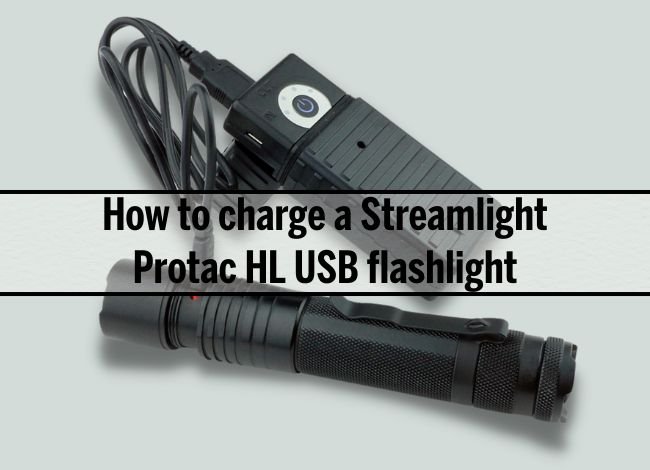
If you’re wondering how to charge a Streamlight ProTac HL USB flashlight properly, you’re not alone. This rechargeable tactical flashlight is known for its powerful beam, durable construction, and convenient charging system. However, some owners have questions about charging time, indicator lights, and battery compatibility.
The Streamlight ProTac HL USB uses a rechargeable lithium-ion battery and features a protected micro-USB charging port. Unlike flashlights that require you to remove the battery for every charge, this model lets you recharge the included battery directly inside the flashlight.
In this guide, we’ll walk you through the charging process, explain what the red and green indicator lights mean, and share practical tips for improving battery life. We’ll also cover troubleshooting, updated 2026 specifications, and the differences between the ProTac HL USB and ProTac HPL USB.
Important: This article focuses on the Streamlight ProTac HL USB, not the larger ProTac HPL USB. Both are rechargeable models, but they have different beam characteristics and performance specifications.
How to Charge a Streamlight ProTac HL USB Flashlight
One of the most convenient features of the ProTac HL USB is its built-in charging system. You can recharge the supplied Streamlight lithium-ion battery without opening the battery compartment.
Here’s how to do it correctly.
Step 1: Locate the USB Charging Cable
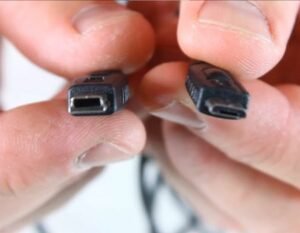
The ProTac HL USB uses a micro-USB charging connection, not USB-C.
The flashlight originally comes with a compatible USB charging cable. If you’ve lost it, you can use a suitable replacement micro-USB cable.
Before connecting the cable, inspect it for damaged insulation, bent connectors, or other visible problems.
Tip: Use a reliable USB power source and avoid damaged or poorly made charging accessories.
Step 2: Access the Charging Port
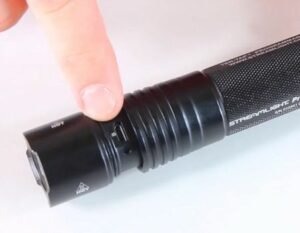
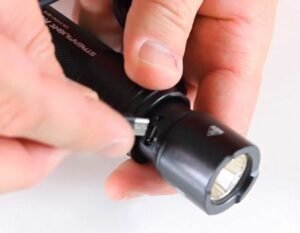
The flashlight has a sliding metal sleeve that protects the micro-USB charging port from dirt and moisture.
- Turn off the flashlight.
- Hold the flashlight body firmly.
- Slide the protective sleeve backward until the charging port is exposed.
- Check that the port is clean and completely dry.
Don’t force the sleeve if it feels stuck. Inspect the area for dirt or debris before trying again.
Step 3: Connect the USB Charging Cable
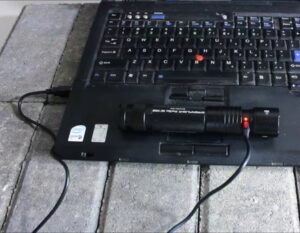
Insert the micro-USB connector into the flashlight’s charging port. Streamlight recommends aligning the marking on its supplied cable with the corresponding marking on the flashlight body.
Then connect the standard USB end to a compatible power source, such as:
- A USB wall adapter.
- A laptop or desktop computer.
- A portable power bank.
- A suitable vehicle USB charging port.
The flashlight can charge from common USB power sources, although charging speed may vary.
Important: Never force the micro-USB connector into the port. If it doesn’t fit easily, check its orientation.
Step 4: Monitor the Charging Indicator
When the cable is connected, a small LED indicator shows the battery’s charging status.
- Red light: The battery is charging.
- Green light: The battery is fully charged.
There is one important exception.
If the rechargeable battery has been completely exhausted, Streamlight says the indicator may initially remain green for approximately 7–10 minutes while the battery completes its preliminary charging stage. After that, the normal red charging indication should appear.
Therefore, an initially green indicator doesn’t always mean a deeply discharged battery is already full.
Step 5: Allow the Flashlight to Charge Fully
According to Streamlight, the included lithium-ion battery takes approximately 7 hours to recharge fully using its specified AC/USB charger with a 1,000mA output.
Charging from a lower-output computer USB port may take longer.
The flashlight includes an electronic charging control system designed to prevent overcharging, but it’s still good practice to disconnect the cable once charging is complete.
Step 6: Disconnect and Close the Charging Port
Once the indicator shows that charging is complete:
- Disconnect the micro-USB cable from the flashlight.
- Slide the protective metal sleeve back over the charging port.
- Make sure the sleeve is properly seated.
- Turn on the flashlight to confirm normal operation.
Closing the protective sleeve is important because it helps prevent dust and moisture from reaching the charging connector.
That’s all you need to know about how to charge a Streamlight ProTac HL USB under normal conditions.
You can also consult the official ProTac HL USB operating instructions for the manufacturer’s charging procedure.
How Long Does the Streamlight ProTac HL USB Take to Charge?
The manufacturer specifies approximately 7 hours for a full charge using the appropriate USB charging adapter and original rechargeable battery.
However, actual charging time depends on several factors:
- Battery charge level: A partially charged battery generally needs less time.
- USB power output: Lower-output ports can charge more slowly.
- Battery condition: An aging battery may not perform like a new one.
- Temperature: Extreme temperatures can interfere with normal charging.
- Cable condition: Damaged or poor-quality cables may cause unreliable connections.
If the charging indicator remains red much longer than expected, check the cable and power source. If the battery becomes excessively hot, stop charging and contact Streamlight support.
Streamlight ProTac HL USB Specifications in 2026
The ProTac HL USB remains listed by Streamlight as a rechargeable tactical flashlight with a maximum output of 1,000 lumens.
Some older reviews mention lower lumen ratings or different battery specifications. The following table reflects the manufacturer’s currently published ProTac HL USB information.
| Feature | Specification |
|---|---|
| Maximum brightness | 1,000 lumens |
| Medium brightness | 380 lumens |
| Low brightness | 65 lumens |
| High runtime | 1.5 hours |
| Medium runtime | 3.5 hours |
| Low runtime | 23 hours |
| Maximum beam distance | 219 meters |
| Maximum intensity | 12,000 candela |
| Charging connection | Micro-USB |
| Rechargeable battery | Streamlight lithium-ion pack, part 74175 |
| Alternative batteries | 2 CR123A lithium batteries or compatible SL-B26 |
| Water resistance | IPX4 |
| Impact resistance | 1 meter |
| Length | 6.5 inches |
| Weight with battery | 7.2 ounces |
| Warranty | Limited lifetime warranty, subject to exclusions |
These specifications are based on the official Streamlight ProTac HL USB product listing.
What Batteries Can You Use in the ProTac HL USB?
The ProTac HL USB offers more flexibility than many rechargeable flashlights because it supports multiple battery options.
1. Streamlight Rechargeable Lithium-Ion Battery
The original rechargeable battery pack, part number 74175, is designed to charge inside the flashlight through its micro-USB port.
This is the most convenient option for regular users who want to recharge without removing the battery.
2. Two CR123A Lithium Batteries
The flashlight also accepts two suitable disposable CR123A lithium batteries.
These can be useful when you’re traveling or don’t have access to a USB charging source.
However, CR123A primary lithium batteries are not rechargeable. Do not attempt to recharge them.
3. Streamlight SL-B26 Rechargeable Battery
Streamlight also lists its protected SL-B26 rechargeable lithium-ion battery pack as compatible.
Unlike the original 74175 battery, the SL-B26 must be charged through its own supported charging connection or charging equipment. It doesn’t recharge through the flashlight’s built-in micro-USB system.
Important: Using a rechargeable battery that physically fits doesn’t automatically make it compatible. Follow the manufacturer’s voltage, size, and protection requirements.
For additional information, see our flashlight battery types and compatibility guide.
Streamlight ProTac HL USB Charging Problems and Solutions
If the flashlight doesn’t charge normally, the issue may involve the cable, power source, charging port, or battery itself.
| Problem | Possible Cause | Recommended Solution |
|---|---|---|
| Charging indicator stays off | Faulty cable, power source, or charging connection | Check the connection and try another compatible cable |
| Indicator initially shows green | Deeply discharged battery entering pre-charge | Allow 7–10 minutes and check whether normal charging begins |
| Charging takes too long | Low-output USB port or battery issue | Try a suitable USB adapter and inspect the battery |
| Flashlight won’t turn on | Low battery, incorrect installation, or dirty contacts | Check battery orientation and accessible contacts |
| Battery drains quickly | Battery aging or extended high-mode use | Try lower brightness settings and assess battery condition |
| Battery becomes excessively hot | Possible battery or charging fault | Stop charging and contact Streamlight support |
Why Does the Charging Light Stay Green?
A green indicator normally means the battery is fully charged. However, when the supplied rechargeable battery has been completely drained, the indicator may stay green briefly before normal charging begins.
Streamlight states that this preliminary stage can last approximately 7–10 minutes.
If the indicator never changes and the battery won’t power the flashlight, try a different compatible charging source and contact support if the problem continues.
Can You Use the ProTac HL USB While Charging?
No. According to Streamlight’s operating instructions, the flashlight doesn’t operate normally while the original battery is being charged through the built-in USB connection.
Disconnect the charging cable and close the protective sleeve before using the flashlight.
Why Choose the Streamlight ProTac HL USB?
Besides its convenient charging system, the ProTac HL USB has several features that make it useful for work, emergencies, and outdoor activities.
1. Powerful 1,000-Lumen Output
The flashlight produces up to 1,000 lumens in high mode, with a maximum beam distance of 219 meters.
That’s useful for illuminating outdoor spaces, inspecting equipment, or navigating dark environments.
Lower output settings help preserve battery power when maximum brightness isn’t necessary.
2. USB Rechargeability
The ability to recharge the supplied battery inside the flashlight makes the ProTac HL USB convenient for frequent use.
You can connect it to a suitable USB power source without carrying a separate battery charger.
However, the flashlight uses the older micro-USB connector rather than USB-C, which may be less convenient if most of your other devices use newer charging cables.
3. TEN-TAP Programmable Modes
Streamlight’s TEN-TAP programming allows you to choose between three operating sequences:
- High / Strobe / Low: Factory-default program.
- High Only: Provides straightforward maximum-brightness operation.
- Low / Medium / High: Offers greater control over brightness and runtime.
To change programs, quickly tap the tail switch nine times and hold the tenth press until the light turns off. Release the switch to complete the change.
Repeat this procedure to cycle through the three programs.
For another example of Streamlight’s programmable controls, read our ProTac HL-X TEN-TAP programming guide.
4. Durable Aluminum Construction
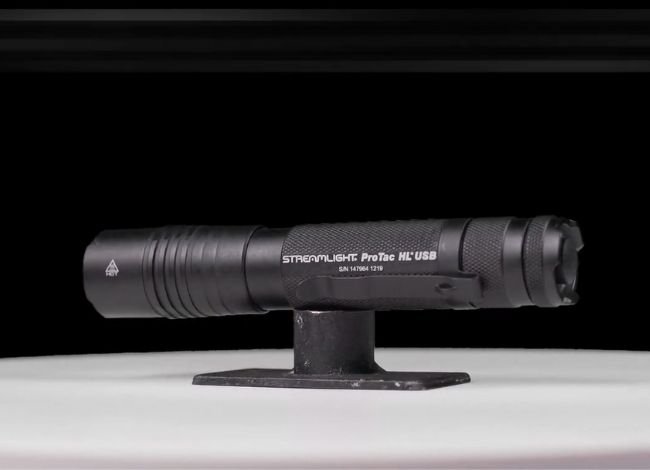
The ProTac HL USB uses an anodized aluminum body designed for regular professional and outdoor use.
It also includes a removable pocket clip, an anti-roll head, and a protective charging-port sleeve.
5. IPX4 Water Resistance
The flashlight carries an IPX4 water-resistance rating, meaning it can withstand splashing water under specified test conditions.
However, it isn’t designed for underwater use. IPX4 is different from IPX7 or IPX8, which involve immersion testing.
Always make sure the charging-port sleeve is closed before using the flashlight in wet conditions.
Streamlight ProTac HL USB vs. ProTac HPL USB
The ProTac HL USB and HPL USB have similar names, but they serve different purposes.
The ProTac HL USB provides a balanced beam in a more compact body, while the HPL USB is designed for longer-distance illumination with substantially higher beam intensity.
| Feature | ProTac HL USB | ProTac HPL USB |
|---|---|---|
| Maximum brightness | 1,000 lumens | 1,000 lumens |
| Maximum beam distance | 219 meters | 374 meters |
| Maximum candela | 12,000 | 35,000 |
| Length | 6.5 inches | 7.08 inches |
| Weight with battery | 7.2 ounces | 9.24 ounces |
| Best suited for | General-purpose tactical lighting | Long-distance illumination |
If you regularly need to illuminate distant objects, the HPL USB offers the stronger long-range beam. For general use in a more compact flashlight, the HL USB may be the better choice.
How to Maintain Your ProTac HL USB Battery
Proper battery care helps maintain reliable performance and reduces the risk of premature battery failure.
- Recharge periodically: Don’t leave a lithium-ion battery completely depleted for extended periods.
- Store properly: Keep the flashlight in a cool, dry location.
- Inspect the USB port: Check for dirt, corrosion, and moisture before charging.
- Protect the connector: Close the sliding sleeve after charging.
- Avoid excessive heat: Don’t leave the flashlight charging in a hot vehicle or direct sunlight.
- Use suitable batteries: Choose only battery types approved for the flashlight.
- Check the tail-cap contacts: Dirty or loose connections can cause intermittent operation.
For long-term storage, follow Streamlight’s battery recommendations and inspect the flashlight before putting it back into service.
Frequently Asked Questions About Streamlight ProTac HL USB Charging
1. How do I charge my Streamlight ProTac HL USB flashlight?
Slide back the protective metal sleeve to expose the micro-USB charging port. Connect a compatible micro-USB cable and USB power source. The indicator shows red while charging and green when fully charged.
2. How long does the Streamlight ProTac HL USB take to charge?
The included rechargeable battery takes approximately 7 hours to charge with Streamlight’s specified 1,000mA USB charging adapter. Lower-output USB ports may take longer.
3. How many lumens does the ProTac HL USB produce?
The currently listed ProTac HL USB delivers 1,000 lumens on high, 380 lumens on medium, and 65 lumens on low.
4. Can I use regular CR123A batteries in the ProTac HL USB?
Yes. Streamlight specifies two compatible CR123A primary lithium batteries as an alternative power source. However, they are not rechargeable and must never be charged through the flashlight’s USB connection.
5. Is the Streamlight ProTac HL USB waterproof?
It has an IPX4 water-resistance rating, which protects against splashing water. It isn’t rated for submersion. Always close the protective charging sleeve before exposure to moisture.
6. Why is my Streamlight ProTac HL USB charging light green?
Green usually means the battery is fully charged. However, after complete battery depletion, the indicator may initially remain green for approximately 7–10 minutes before changing to red as normal charging begins.
Final Verdict: Is the Streamlight ProTac HL USB Worth It?
The Streamlight ProTac HL USB remains a dependable rechargeable flashlight for everyday use, professional work, and emergency lighting. Its 1,000-lumen maximum output, programmable brightness settings, and versatile battery options make it a practical choice.
Although its micro-USB charging system is older than the USB-C connections found on many newer flashlights, the ability to recharge the included battery without removing it remains convenient.
Knowing how to charge a Streamlight ProTac HL USB correctly also helps you avoid common mistakes. Use a suitable cable, monitor the charging indicator, protect the charging port, and follow the manufacturer’s battery recommendations.
With regular maintenance and proper charging habits, the ProTac HL USB can continue providing reliable illumination for years.
If you’re considering other models, explore our tactical flashlight comparison guide to find additional lighting options for your needs.