Last Updated on October 8, 2026
Knowing how to change batteries in Coast flashlight models is important for keeping your light working when you need it. Coast flashlights are known for their durable construction and powerful beams, but even a reliable flashlight won’t perform properly with weak or incorrectly installed batteries.
Whether you use a Coast G32, HP7, or HP550, replacing the batteries is usually a simple job. The main thing is knowing how to open the battery compartment, which batteries your model requires, and how to install them correctly.
In this guide, we’ll walk you through the battery replacement process for these three popular Coast flashlights. We’ll also cover common mistakes, battery safety, and what to check if your flashlight still doesn’t turn on afterward.
How to Change Batteries in Coast Flashlight Models
Most Coast flashlights with replaceable batteries have a removable tail cap. Once you open it, you can remove the old batteries or slide out the battery cartridge.
However, the exact process depends on the model. Some use AA batteries, others use AAA batteries, and certain newer models support manufacturer-approved rechargeable battery packs.
Before starting, turn off the flashlight and disconnect any charging cable. Work on a clean surface and keep a fresh set of compatible batteries nearby.
Here is a quick comparison of the models covered in this guide.
| Coast Model | Battery Requirement | Battery Access |
|---|---|---|
| Coast G32 | 2 AA alkaline batteries | Removable tail cap |
| Coast HP7 | 4 AAA batteries | Tail cap and battery cartridge |
| Coast HP550 | 9 AA batteries | Tail cap and battery cartridge |
Always confirm the exact model number before buying replacement batteries, particularly if you own a newer or rechargeable version.
Coast G32 Flashlight Battery Replacement
The Coast G32 is a compact flashlight suitable for everyday use, household tasks, and outdoor activities. It has an adjustable beam and uses two AA alkaline batteries in its standard configuration.
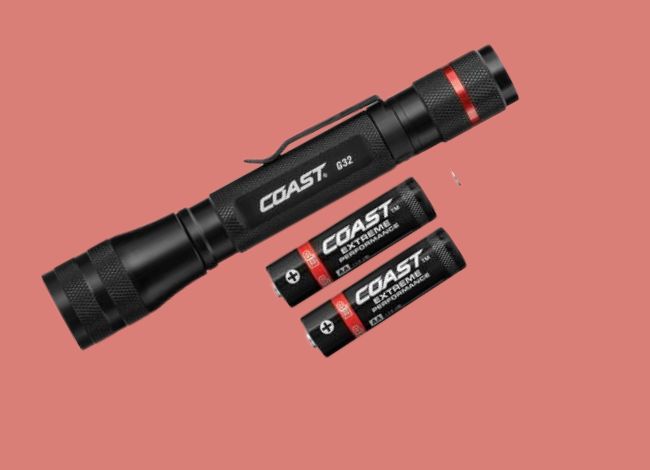
What Type of Battery Does the Coast G32 Use?
The standard G32 uses two AA alkaline batteries. These are widely available, affordable, and convenient to replace.
Some G32 versions also support a compatible COAST ZITHION-X rechargeable battery under the manufacturer’s Dual Power system. This battery is different from an ordinary third-party rechargeable AA cell, so check your model’s instructions before switching battery types.
Steps to Replace the Coast G32 Batteries
- Remove the tail cap. Hold the flashlight firmly and turn the rear cap counterclockwise to open the battery compartment.
- Take out the old batteries. Carefully slide both AA batteries out. Inspect them for leakage or corrosion.
- Insert two fresh AA batteries. On the G32 described in the manufacturer’s instructions, the positive terminals face toward the flashlight head.
- Reattach the tail cap. Turn it clockwise until securely closed. Don’t over-tighten the threads.
- Test the flashlight. Press the power switch and check that both brightness settings operate normally.
If you’re using the approved ZITHION-X rechargeable battery, follow its separate charging instructions. On compatible versions, the rechargeable battery is removed and charged through the USB port on the battery itself.
Replacing Batteries in Coast HP7 Flashlight
The Coast HP7 is a larger flashlight with an adjustable focus beam. It’s useful for outdoor activities, security work, and situations where you need more light than a small pocket flashlight provides.
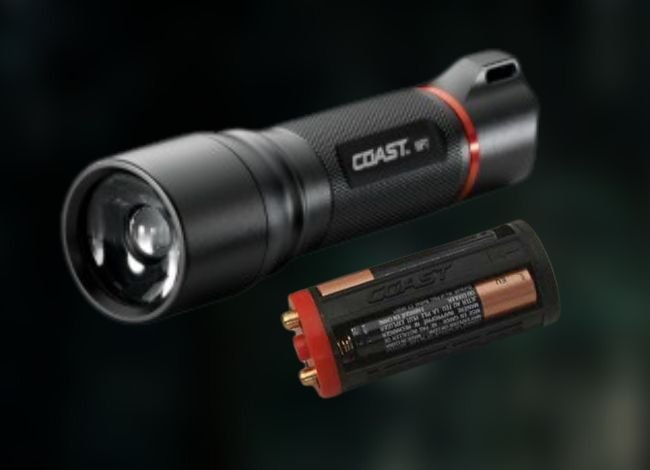
What Type of Battery Does the Coast HP7 Use?
The Coast HP7 models covered here use four AAA batteries installed inside a removable plastic cartridge.
Unlike the G32, you don’t simply drop the batteries into the flashlight tube. You first remove the cartridge and install the batteries according to the polarity markings.
Steps to Replace the Coast HP7 Batteries
- Remove the tail cap. Unscrew the rear cap by turning it counterclockwise.
- Take out the battery cartridge. Carefully slide the plastic holder out of the flashlight body.
- Remove the old AAA batteries. Check the cartridge for corrosion, damaged contacts, or battery leakage.
- Insert four fresh AAA batteries. Match the positive and negative terminals with the markings on the cartridge.
- Reinstall the cartridge. For the HP7 version described in COAST’s instructions, insert the red end of the cartridge first.
- Reattach the tail cap. Screw it clockwise until the compartment is securely closed.
- Turn on the flashlight. Test the switch and available lighting modes.
Maintenance Tip: If you plan to store your HP7 for several months, remove the disposable batteries. This reduces the risk of leakage damaging the contacts.
How to Replace Batteries in the Coast HP550 Flashlight
The Coast HP550 is a larger flashlight designed for demanding lighting tasks. Its powerful beam requires more battery power than compact models, which is why it uses a larger battery cartridge.
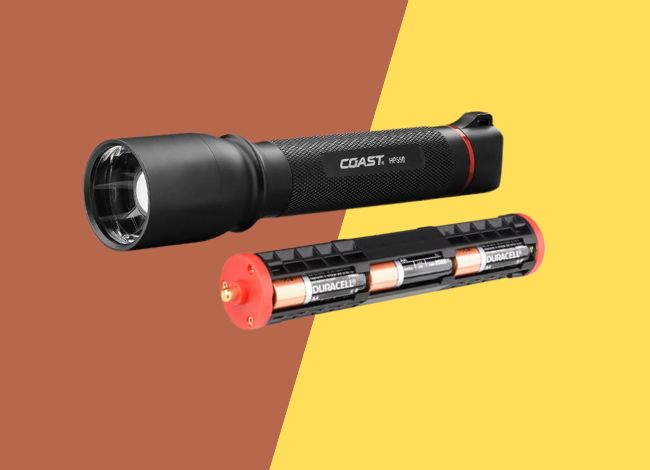
What Batteries Does the Coast HP550 Use?
The HP550 uses nine AA alkaline batteries held inside a removable battery cartridge.
It’s important to replace the entire set at the same time. Mixing fresh batteries with partly discharged ones can reduce performance and increase the risk of leakage.
Steps to Replace the Coast HP550 Batteries
- Unscrew the tail cap. Turn the rear cap counterclockwise until it comes off.
- Remove the battery cartridge. Gently slide the cartridge out of the flashlight body.
- Take out the old batteries. Remove them one at a time, lifting the positive end first as described in the HP550 instructions.
- Install nine fresh AA batteries. Follow the positive (+) and negative (-) markings on the cartridge. Insert the negative end under its retaining tab first, then gently press the positive end into position.
- Reinstall the cartridge. Slide it back into the flashlight. The original HP550 cartridge can be installed with either end entering the flashlight first.
- Close the tail cap. Tighten it securely without forcing the threads.
- Test the light. Turn it on and check its high and low settings.
If you have trouble removing the HP550 cartridge, the video below shows a battery-removal example.
Caution: If the cartridge is stuck because of leaking or swollen batteries, don’t strike the flashlight, puncture the batteries, or pry them out with a metal tool. Contact COAST support if gentle removal doesn’t work.
If you need to understand how removable parts fit together, our Coast flashlight disassembly guide explains the construction of the PX20 and G25. Those instructions are model-specific and shouldn’t be used to force open an HP550.
What If Your Coast Flashlight Still Doesn’t Turn On?
Sometimes, changing the batteries doesn’t solve the problem. If your flashlight still won’t turn on, check the following before assuming the LED has failed.
1. Incorrect Battery Orientation
Double-check the positive and negative markings. This is especially important on the HP7 and HP550 because their battery cartridges hold several cells.
2. Dirty or Corroded Contacts
Dust and light corrosion can interrupt the electrical connection.
Remove the batteries and inspect the accessible contacts. Use a soft, dry cloth or brush for loose dirt. If appropriate, a cotton swab lightly moistened with isopropyl alcohol can help clean exposed metal contacts.
Let everything dry completely before reinstalling the batteries. If you discover heavy battery leakage or damaged contacts, seek professional advice.
3. Loose Tail Cap or Battery Cartridge
Make sure the battery cartridge is fully seated and the tail cap is properly tightened. A loose connection may cause the flashlight to flicker or stop working.
4. Faulty Power Switch
If the flashlight works only after several button presses, the switch may be worn or dirty.
Clean around the external switch, but avoid forcing open sealed components. Our push-button flashlight troubleshooting guide explains additional checks for common switch problems. Not every repair method will apply to Coast models.
5. Internal Electrical Damage
If the flashlight was dropped, exposed to water, or affected by battery leakage, internal parts may be damaged.
Don’t attempt to open sealed circuits or LED assemblies without model-specific service instructions.
If you’ve completed the battery checks and the light still refuses to work, our guide on why a Coast flashlight is not working covers charging faults, moisture damage, intermittent operation, and repair options in more detail.
You can also contact COAST customer support for repair or warranty assistance.
Common Battery Replacement Mistakes to Avoid
Learning how to change batteries in Coast flashlight models also means knowing what not to do.
- Don’t mix old and new batteries. Replace the entire set together.
- Don’t mix battery chemistries. Use the battery type approved for your flashlight.
- Don’t ignore polarity markings. Incorrect installation can prevent the light from working.
- Don’t charge disposable alkaline batteries. Only charge batteries specifically designed for recharging.
- Don’t force stuck batteries. Swollen or leaking batteries require careful handling.
- Don’t over-tighten the tail cap. Excessive force can damage threads or seals.
If you’re unsure about the differences between alkaline, lithium, and lithium-ion batteries, our guide to flashlight battery types explains their voltage, compatibility, and common uses.
If your Coast flashlight supports a proprietary rechargeable battery, use the charging equipment specified by the manufacturer. A regular rechargeable cell isn’t automatically compatible just because it has similar dimensions.
Battery Tips for Long-Term Flashlight Use
A little battery maintenance can help prevent many common flashlight problems.
- Remove disposable batteries before long-term storage.
- Store your flashlight in a cool, dry location.
- Keep the battery compartment clean and free of corrosion.
- Replace multi-cell battery sets together.
- Carry spare batteries during camping trips or emergencies.
- Check battery condition periodically, especially in emergency flashlights that aren’t used often.
- Recycle used batteries according to local guidelines.
For rechargeable flashlights, follow the manufacturer’s storage and charging recommendations. Don’t leave damaged rechargeable batteries connected to a charger.
Does Coast Cover Battery Problems Under Warranty?
COAST offers a lifetime warranty against manufacturing defects on qualifying LED flashlights and headlamps for the original purchaser in the United States and Canada.
However, the flashlight warranty doesn’t generally cover damage from battery leakage, misuse, or normal wear and tear. Rechargeable batteries and accessories may have separate coverage.
Before attempting internal repairs, review the official COAST warranty policy and contact support if necessary.
Frequently Asked Questions
How do I open a Coast flashlight to change the batteries?
On many Coast models, turn the tail cap counterclockwise to access the battery compartment. Some models have a removable cartridge, while others hold the batteries directly inside the flashlight body. Follow your model’s instructions.
What type of batteries does a Coast flashlight use?
It depends on the model. The G32 commonly uses two AA alkaline batteries, the HP7 uses four AAA batteries, and the HP550 uses nine AA batteries. Other Coast flashlights may use different or rechargeable battery systems.
Why won’t my Coast flashlight turn on after changing batteries?
Check battery polarity, contacts, cartridge alignment, and the tail cap. If the light still won’t work, the problem may involve the switch or internal electronics.
Can I use rechargeable batteries in my Coast flashlight?
Only if your model supports the specific rechargeable battery. Some Coast Dual Power models accept approved ZITHION-X batteries, but standard alkaline-only models shouldn’t be assumed compatible with lithium-ion cells.
How often should I replace Coast flashlight batteries?
Replace disposable batteries when output becomes weak, the flashlight starts operating inconsistently, or the batteries are depleted. For emergency flashlights, inspect stored batteries periodically rather than waiting for them to fail.
Can I replace just one battery in my Coast HP550?
It’s better to replace all nine AA batteries together. Mixing old and new cells can reduce performance and may increase the risk of leakage.
Final Thoughts
Knowing how to change batteries in Coast flashlight models can save you time and help prevent unnecessary repairs.
The process is straightforward once you know your model’s battery requirements. The G32 uses two AA batteries, the HP7 has a four-AAA cartridge, and the HP550 holds nine AA batteries in a larger cartridge.
Always install the correct batteries, follow the polarity markings, and check the contacts before closing the compartment.
If your flashlight still doesn’t work after installing fresh batteries, inspect the accessible connections and consider contacting COAST support.
If you’re comparing replacement models or considering a different battery system, our Coast flashlight reviews and buying guide covers other available designs and features.
With proper battery replacement and a little regular care, your Coast flashlight can remain a dependable source of light for years.
The flashlight worked well until a battery change was needed. Could not remove the battery cartridge. Followed the video of how to remove the cartridge and was partially successful. Clearly, there is a design flaw to the flashlight. Have you designed a new cartridge to resolve this design flaw ? At this time these flashlights are single use and throw-away as the cartridge cannot be simply removed.