Last Updated on October 18, 2026
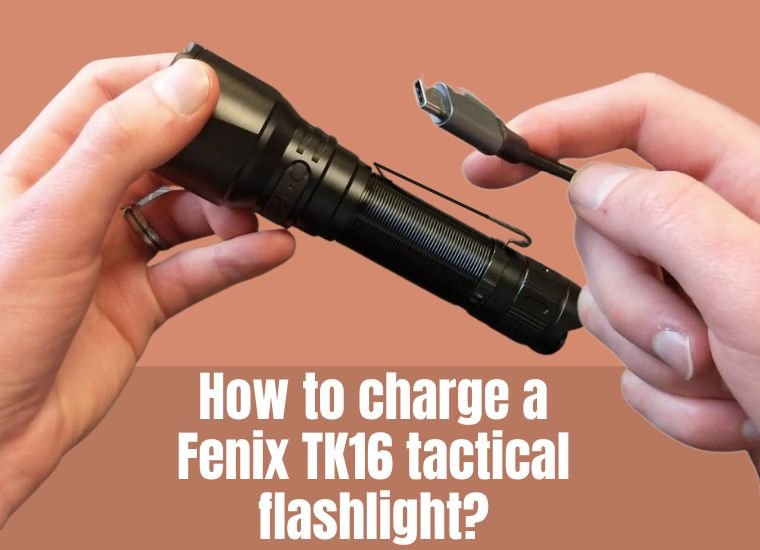
The Fenix TK16 is a powerful and reliable tactical flashlight designed for demanding environments. The upgraded Fenix TK16 V2.0 delivers up to 3,100 lumens with a maximum beam distance of 380 meters. Its dual-tail switch, rugged construction, and multiple brightness levels make it a practical choice for outdoor enthusiasts, security professionals, and emergency use.
However, to get the best performance from your flashlight, it’s important to understand how to charge a Fenix TK16 correctly. Unlike many rechargeable flashlights, the TK16 V2.0 doesn’t have a built-in USB charging port on its body. Instead, you remove the rechargeable battery and charge it separately.
In this guide, we’ll explain the charging procedure, battery compatibility, charging safety, and common troubleshooting steps. We’ll also review the flashlight’s main features, performance, and maintenance requirements.
Important: This guide primarily covers the Fenix TK16 V2.0, which uses a 21700 rechargeable lithium-ion battery. The original TK16 uses a different battery arrangement and has different specifications.
How to Charge a Fenix TK16: Step-by-Step Instructions
The Fenix TK16 V2.0 comes with a Fenix ARB-L21-5000U rechargeable 21700 lithium-ion battery. This battery has its own USB-C charging port, allowing you to charge it without a separate desktop battery charger.
Follow these steps to charge it safely.
Step 1: Turn Off the Flashlight and Remove the Battery
- Make sure the flashlight is completely switched off.
- Hold the flashlight securely with one hand.
- Unscrew the tail cap counterclockwise.
- Carefully slide the rechargeable battery out of the flashlight body.
- Inspect the battery for visible damage, swelling, or corrosion.
Never attempt to charge a battery that is swollen, leaking, punctured, or unusually hot.
Step 2: Connect the USB-C Charging Cable
Locate the USB Type-C charging port on the Fenix ARB-L21-5000U battery.
- Connect the USB-C end of a compatible charging cable to the battery.
- Connect the other end to a suitable USB power adapter or power bank.
- Place the battery on a stable, dry, nonflammable surface while charging.
The Fenix TK16 V2.0 package normally includes a USB-C charging cable, so you don’t need to purchase a separate charger if you’re using the supplied USB-rechargeable battery.
You can also charge the compatible battery using a Fenix-approved external battery charger.
Step 3: Check the Battery Charging Indicator
The ARB-L21-5000U battery includes an indicator light near its charging connection.
- Red indicator: The battery is charging.
- Blue indicator: The battery is fully charged.
These colors apply to the ARB-L21-5000U battery. Other Fenix rechargeable batteries and flashlight charging systems may use different indicator colors.
Check the indicator occasionally, and disconnect the battery when charging is complete.
Step 4: Allow the Battery to Charge Fully
Charging time depends on the battery’s remaining charge, the USB power source, and the charging conditions.
For a 5,000mAh battery, a full charge may take several hours. Avoid relying on a fixed charging time because USB adapters and charging circuits can operate at different rates.
The charging indicator is a more reliable way to determine when the battery has finished charging.
Step 5: Reinstall the Battery
After the charging indicator shows that the battery is full:
- Disconnect the USB charging cable.
- Allow the battery to cool if it feels warm.
- Insert the battery into the flashlight with the positive (+) end facing the flashlight head.
- Reattach the tail cap and tighten it securely without excessive force.
- Turn on the flashlight to confirm that it works correctly.
That’s all you need to do. Once you understand how to charge a Fenix TK16, routine battery maintenance becomes straightforward.
For manufacturer information, visit the official Fenix TK16 V2.0 product and operating guide.
Can You Charge the Fenix TK16 Without Removing the Battery?
No. The Fenix TK16 V2.0 doesn’t have an integrated charging port on the flashlight body.
To charge the included ARB-L21-5000U battery, you must remove it and connect a USB-C cable directly to the battery.
This is different from rechargeable Fenix models such as the UC35, which feature a charging connection on the flashlight itself.
If you’re comparing these charging systems, our guide on charging the Fenix UC35 flashlight explains the process for that model.
Fenix TK16 Battery Specifications and Compatibility
Using the correct battery is essential for safe operation and full performance.
The TK16 V2.0 is designed for specific high-performance 21700 rechargeable lithium-ion batteries.
Fenix ARB-L21-5000U Battery Specifications
- Battery type: Rechargeable lithium-ion.
- Size: 21700.
- Capacity: 5,000mAh.
- Nominal voltage: 3.6V.
- Charging connection: USB Type-C.
- Protection: Built-in circuitry designed to reduce risks associated with short circuits and other electrical faults.
- Charging indicator: Red during charging and blue when fully charged.
Fenix also lists the ARB-L21-4000P as a compatible battery for the TK16 V2.0.
Compatibility warning: Not every Fenix 21700 battery is suitable for this flashlight. Fenix specifically notes that the ARB-L21-6000 and ARB-L21-6000B are not compatible with the TK16 V2.0.
The original TK16 and the TK16 V2.0 also have different power requirements. Don’t assume batteries are interchangeable between the two generations.
For more details about battery sizes, voltage, and chemistry, read our flashlight battery types and compatibility guide.
Safety Tips While Charging the Fenix TK16
Lithium-ion batteries provide excellent performance, but they should always be handled carefully.
- Use compatible equipment: Charge with an appropriate USB power source or manufacturer-approved external charger.
- Keep the battery dry: Never charge a wet battery or use a charging connection exposed to moisture.
- Avoid excessive heat: Don’t charge near direct sunlight, heaters, or other heat sources.
- Inspect the battery: Stop using batteries that are swollen, leaking, damaged, or overheating.
- Prevent short circuits: Keep exposed battery terminals away from keys, coins, and other metal objects.
- Avoid unattended charging: Charge in a location where you can periodically check the battery.
- Disconnect after charging: Remove the cable when the charging indicator shows completion.
Important: Never attempt to charge disposable batteries or use an unapproved lithium-ion cell in the TK16 V2.0.
Fenix TK16 Charging Problems and Troubleshooting
If you’re having trouble charging your Fenix TK16 battery, start with the charging cable and power source before assuming the battery has failed.
| Problem | Possible Cause | Recommended Solution |
|---|---|---|
| Battery not charging | Faulty cable or power adapter | Try another compatible USB cable or power source |
| No charging indicator | Connection problem, damaged port, or battery fault | Check connections and inspect for damage |
| Flashlight won’t turn on | Incorrect battery orientation or dirty contacts | Check polarity and clean accessible contacts |
| Battery drains quickly | Battery aging or frequent Turbo use | Test lower modes and consider a compatible replacement battery |
| Battery becomes unusually hot | Charging fault or damaged battery | Stop charging and arrange safe inspection or replacement |
| Charging takes unusually long | Low-output adapter or unstable connection | Use a suitable USB power source and inspect the cable |
What If the TK16 Still Doesn’t Work After Charging?
If the battery charges successfully but the flashlight still won’t turn on:
- Check that you’re using an approved battery.
- Confirm that the positive terminal faces the flashlight head.
- Inspect accessible electrical contacts for dirt.
- Clean dirty contacts carefully with a cotton swab lightly dampened with isopropyl alcohol.
- Allow the contacts to dry and reinstall the battery.
- Make sure the tail cap is securely tightened.
If the flashlight remains unresponsive, contact Fenix support instead of dismantling the sealed LED head.
Why the Fenix TK16 V2.0 Is a Popular Tactical Flashlight
Now that you know how to charge a Fenix TK16, let’s look at what makes the V2.0 model useful for demanding applications.
1. Durable Aluminum Construction
The TK16 V2.0 uses A6061-T6 aluminum with a hard-anodized finish designed to resist abrasion and everyday wear.
- Compact body measuring approximately 5.63 inches long.
- Weight of approximately 3.95 ounces without the battery.
- Impact resistance rated at 1 meter.
- Durable construction suitable for demanding outdoor environments.
2. Powerful LED Output
The TK16 V2.0 uses a Luminus SST70 LED with a manufacturer-rated lifespan of 50,000 hours.
Its maximum output reaches 3,100 lumens, with a beam distance of up to 380 meters.
Keep in mind that maximum brightness doesn’t remain constant throughout the entire Turbo runtime. Thermal regulation reduces output when the flashlight becomes too hot.
3. Convenient Dual-Tail Switch
The flashlight features two separate switches at the rear:
- Round tactical switch: Provides momentary or constant illumination.
- Oval functional switch: Changes brightness levels and provides quick access to strobe.
With the flashlight on, pressing the functional switch cycles through Eco, Low, Medium, High, and Turbo.
The flashlight also remembers the most recently selected normal brightness level, excluding strobe.
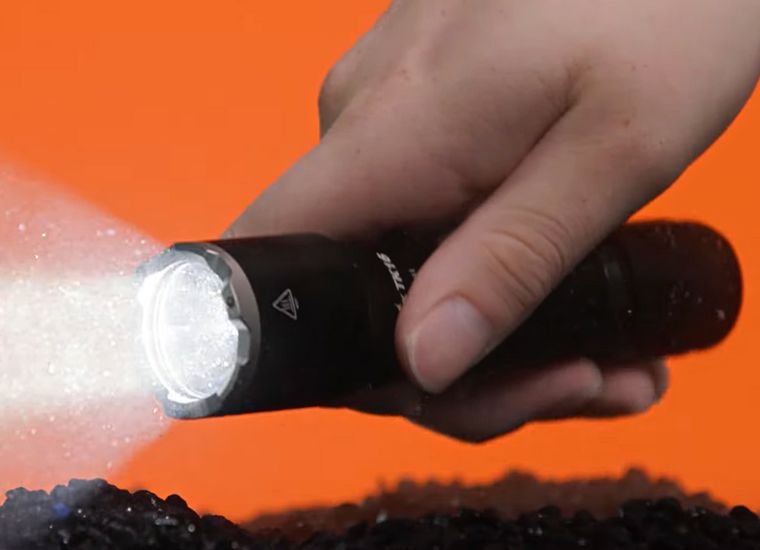
4. IP68 Water and Dust Resistance
The TK16 V2.0 carries an IP68 rating. Fenix specifies protection against dust and immersion in water up to 2 meters for 30 minutes under its testing conditions.
However, proper sealing depends on the condition of the tail-cap O-ring and other components.
Always inspect the flashlight after exposure to water and dry it before opening the battery compartment.
Fenix TK16 V2.0 Brightness Levels and Runtime
The TK16 V2.0 offers five brightness levels and a strobe setting, making it flexible enough for close-range tasks and longer-distance illumination.
| Mode | Brightness | Rated Runtime |
|---|---|---|
| Turbo | 3,100 lumens | 2 hours 40 minutes* |
| High | 1,000 lumens | 2 hours 50 minutes |
| Medium | 350 lumens | 8 hours 20 minutes |
| Low | 150 lumens | 19 hours 10 minutes |
| Eco | 30 lumens | 43 hours 20 minutes |
| Strobe | 3,100 lumens | Not separately specified |
*Turbo runtime includes periods of reduced brightness caused by thermal regulation. Actual runtime depends on battery condition, ambient temperature, and usage.
These are the manufacturer’s published TK16 V2.0 performance figures. For the full specifications, visit the Fenix TK16 V2.0 product page.
Additional Features of the Fenix TK16 V2.0
USB-C Rechargeable Battery
Although the flashlight doesn’t have a built-in charging port, the included USB-C rechargeable battery makes it possible to recharge without carrying a separate desktop charger.
Intelligent Memory Circuit
The flashlight remembers the last selected normal brightness level when switched off and restores that level the next time it is turned on.
Intelligent Overheat Protection
The TK16 V2.0 uses temperature-based output regulation. When the flashlight becomes excessively hot, it automatically reduces brightness to help control heat buildup.
This feature is especially useful during extended high-output operation.
Tactical Ring and Stainless Steel Bezel
The TK16 V2.0 includes a tactical ring and a stainless steel strike bezel with tungsten steel tips.
The bezel adds durability but also creates hard, protruding contact points. Avoid using it in ways that could cause accidental injuries or damage.
Maintenance Tips for Long-Term Use
Proper maintenance helps extend the usable life of your TK16 and its rechargeable battery.
- Clean accessible contacts: Use a cotton swab lightly dampened with isopropyl alcohol when necessary.
- Inspect O-rings: Replace worn or damaged seals with manufacturer-approved replacements.
- Store the flashlight properly: Keep it in a cool, dry environment.
- Maintain battery charge: Check and recharge stored batteries periodically rather than leaving them completely depleted.
- Avoid excessive heat: Don’t leave the flashlight or its battery in direct sunlight or a hot vehicle.
- Prevent accidental activation: Loosen the tail cap slightly or remove the battery for extended storage, following the manual.
- Use compatible replacements: Purchase batteries approved for the TK16 V2.0.
Understanding the main flashlight components and their functions can also make routine troubleshooting easier.
Pros and Cons of the Fenix TK16 V2.0
| Pros | Cons |
|---|---|
| Powerful 3,100-lumen maximum output | Battery must be removed for charging |
| 380-meter maximum beam distance | No built-in USB-C charging port on the flashlight body |
| Convenient dual-tail switch system | Battery compatibility is limited to specified models |
| IP68 water and dust resistance | Turbo mode generates considerable heat |
| USB-C rechargeable battery included | No integrated battery-level display |
| Five brightness levels plus strobe | Less convenient to recharge frequently than models with body-mounted charging ports |
Frequently Asked Questions About Charging the Fenix TK16
1. How do I charge a Fenix TK16 V2.0 flashlight?
Remove the included ARB-L21-5000U rechargeable battery and connect a USB-C charging cable directly to the battery’s charging port. The indicator shows red while charging and blue when fully charged.
2. Can I charge the Fenix TK16 without removing the battery?
No. The TK16 V2.0 doesn’t include a USB charging port on the flashlight body. The battery must be removed and charged separately, either through its built-in USB-C connection or with a compatible external charger.
3. How long does it take to charge the Fenix TK16 battery?
Charging typically takes several hours, depending on the battery’s remaining capacity and the USB power source. Check the battery’s charging indicator rather than relying entirely on a fixed charging time.
4. What battery does the Fenix TK16 V2.0 use?
It uses a compatible 21700 rechargeable lithium-ion battery. Fenix specifies the ARB-L21-5000U and ARB-L21-4000P. Not every 21700 battery is compatible with the flashlight.
5. Why is my Fenix TK16 battery not charging?
A damaged cable, unsuitable power adapter, dirty charging connection, or failing battery may prevent charging. Try another compatible cable or power source and inspect the battery for damage. Never continue charging a swollen or overheating battery.
6. Is the Fenix TK16 V2.0 waterproof?
Yes. It has an IP68 rating and is tested for immersion up to 2 meters for 30 minutes under specified conditions. However, you should always dry the flashlight before opening the battery compartment or removing the battery for charging.
Final Verdict: Is the Fenix TK16 Worth It?
The Fenix TK16 V2.0 remains a capable tactical flashlight for anyone who needs strong illumination, durable construction, and straightforward controls.
Its 3,100-lumen output, long-range beam, and dual-tail switch system make it suitable for demanding outdoor and professional applications. The included USB-C rechargeable battery also offers a convenient alternative to disposable batteries.
The main drawback is that you must remove the battery whenever you want to recharge it. If you charge your flashlight frequently, a model with a built-in charging port may be more convenient.
Now that you know how to charge a Fenix TK16 properly, you can avoid common charging mistakes and maintain reliable performance over time.
If you’re comparing other options, explore our tactical flashlight buying guide for additional models and features.