Last Updated on October 8, 2026
How to Fix a Streamlight Flashlight? Step-by-Step Troubleshooting Guide
Streamlight has been a trusted name in the flashlight industry for more than 50 years. Known for durability, reliability, and dependable performance, Streamlight flashlights are used by law enforcement officers, military personnel, outdoor enthusiasts, and everyday users. Many models are built to withstand rough handling, harsh weather, and demanding working conditions.
However, like any electronic device, even a well-built flashlight can develop problems over time. A weak battery, dirty contact, damaged charger, or faulty switch can leave your flashlight struggling to work when you need it most.
Learning how to fix a Streamlight flashlight can save you time and money. Fortunately, many common problems can be identified without taking the entire flashlight apart.
So, how to fix a Streamlight flashlight that has stopped working? The answer depends on what’s causing the problem. Sometimes, replacing a battery or cleaning the charging contacts is enough. Other times, the flashlight may need professional repair.
Common Streamlight flashlight problems include:
- Flashlight not turning on
- Battery not charging
- Power switch not responding
- Dead or damaged batteries
- Dim or unusually weak light output
- Flickering or intermittent operation
- Flashlight shutting off unexpectedly
Before starting, identify your Streamlight model and check its user manual. Battery requirements, charging methods, and switch designs vary between models.
How to Fix a Streamlight Flashlight: Start With These Basic Checks
Before assuming an internal component has failed, check a few simple things. These are often enough to identify why a flashlight isn’t working.
- Check the battery: Recharge it or install fresh batteries of the correct type.
- Inspect battery orientation: Make sure the positive and negative terminals match the markings inside the flashlight.
- Check the contacts: Look for dirt, corrosion, or damaged battery terminals.
- Tighten the battery compartment: A loose tail cap can interrupt the electrical connection on some models.
- Test the switch: Try the normal operating sequence described in your flashlight’s manual.
- Inspect for damage: Look for signs of moisture, cracked components, or damage from a recent drop.
If the flashlight still doesn’t work, use the sections below to narrow down the problem. You can also learn about the components involved in our guide to the main parts of a tactical flashlight.
Streamlight Not Charging – Causes and Fixes
Charging problems are frustrating, especially when the flashlight appears to be connected properly but the battery never reaches a full charge.
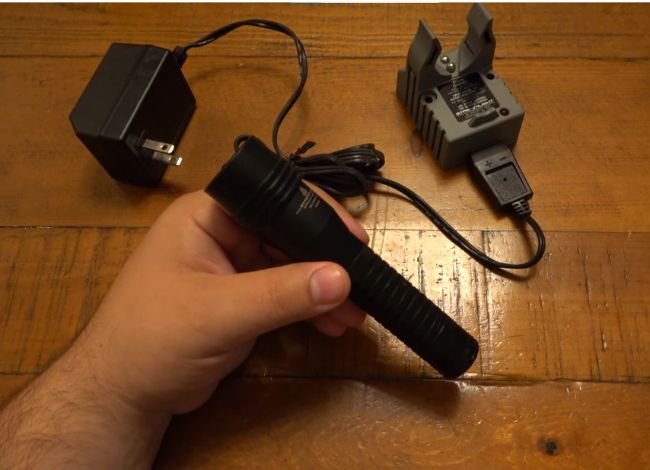
If your rechargeable Streamlight flashlight isn’t charging, inspect these five areas first.
1. Damaged Charger
A damaged charger, cable, or charging cradle can prevent power from reaching the battery.
Check for frayed wires, bent connectors, damaged contacts, or a loose connection. If your model uses a charging cradle, make sure the flashlight sits correctly in the holder.
Try a different compatible power source or a manufacturer-approved replacement charger. Avoid using an incompatible charger just because the connector fits.
2. Dirty or Damaged Charging Port
Dust, lint, and moisture can collect inside USB charging ports. Charging contacts on docking systems can also become dirty or corroded.
Disconnect the charger before cleaning. Use a soft, dry brush to remove loose debris. For exposed charging contacts, follow the cleaning instructions in your model’s manual.
Don’t scrape the port with metal objects or force a damaged connector into place. If the port is loose or physically damaged, professional repair may be necessary.
If you own a ProTac HL USB, our guide on how to charge a Streamlight ProTac HL USB flashlight explains the charging procedure and indicator lights for that model.
3. Worn-Out or Damaged Battery
Rechargeable batteries gradually lose capacity as they age. A battery that once powered your flashlight for several hours may eventually struggle to hold a charge.
Some Streamlight models use rechargeable lithium-ion battery packs, while others use different rechargeable batteries or disposable cells.
If your battery is removable and user-replaceable, check the model number and install only an approved replacement. Our flashlight battery types guide explains the differences between common battery chemistries and sizes.
Never charge a swollen, leaking, overheating, or visibly damaged battery. Stop using it and follow local battery recycling instructions.
4. Incorrect Charging Cable or Adapter
A damaged USB cable or unsuitable power adapter can interrupt charging. Even when a connector fits, the charging setup may not meet the flashlight’s requirements.
Use the charging accessories specified by Streamlight. If your flashlight supports USB charging, try another suitable cable and power source before assuming the battery is defective.
5. Temperature Extremes
Very hot or cold conditions can interfere with charging. Some rechargeable battery systems may reduce or stop charging outside their permitted temperature range.
Move the flashlight to a dry location within the temperature range specified in its manual. Allow it to return to a suitable temperature before charging again.
If your flashlight is no longer economical to repair, see our guide to rechargeable flashlights for replacement options.
Streamlight Flashlight Not Turning On? Here’s What to Do
If your flashlight refuses to turn on despite having a charged or fresh battery, the problem may involve the electrical contacts, switch, battery compatibility, or internal components.
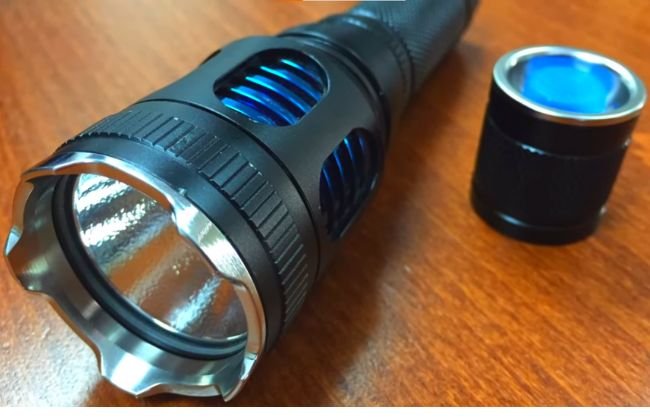
1. Battery or Power Supply Problem
Start with the battery, even if you believe it’s fully charged. A worn-out rechargeable battery may indicate that charging is complete but still fail to supply enough power under load.
If possible, test the flashlight with another approved battery. Don’t substitute a battery with a different voltage or chemistry unless the manufacturer specifically allows it.
2. Loose or Corroded Battery Contacts
Battery contacts are metal springs or pads that connect the battery to the flashlight’s electrical system.
When these contacts become dirty or corroded, the flashlight may stop working, flicker, or turn off unexpectedly.
Remove the battery, then inspect the contacts. For accessible metal contacts, use the cleaning method recommended by Streamlight. A small amount of isopropyl alcohol on a cotton swab may help remove light residue where appropriate. Allow everything to dry completely before reinstalling the battery.
If the contacts are badly corroded, broken, or loose, contact an authorized repair center rather than forcing them back into position.
3. Incorrect Battery Orientation
Some Streamlight models use CR123A batteries, while others use rechargeable battery packs or specific lithium-ion cells.
Always check the polarity markings and battery requirements. Incorrect installation can prevent operation and may damage the flashlight.
Never mix old and new batteries or different battery types in the same flashlight.
4. LED or Internal Circuit Failure
LEDs generally last a long time, but the LED assembly or its electronic driver can still fail because of impact, moisture, or electrical damage.
If the flashlight has a known-good battery, clean contacts, and a functioning switch but produces no light, an internal fault becomes more likely.
Don’t assume the LED itself is defective. On many models, the LED and driver aren’t intended for user replacement. Streamlight service may be the safer option.
5. Incorrect Operating Mode or Switch Programming
Some Streamlight flashlights feature TEN-TAP programming, which lets users select different operating sequences.
If the flashlight suddenly behaves differently, check whether its program has changed.
On compatible TEN-TAP models, changing programs generally involves nine rapid switch taps followed by holding the switch on the tenth press. However, supported modes and operating details vary by model.
For example, our guide on programming the Streamlight ProTac HL-X covers its operating modes and switch settings.
You can also refer to Streamlight’s official TEN-TAP instructions before changing the settings.
Broken Streamlight Power Switch: Troubleshooting and Repair
The power switch is one of the most frequently used parts of a flashlight. Over time, wear, dirt, or physical damage can affect how it works.
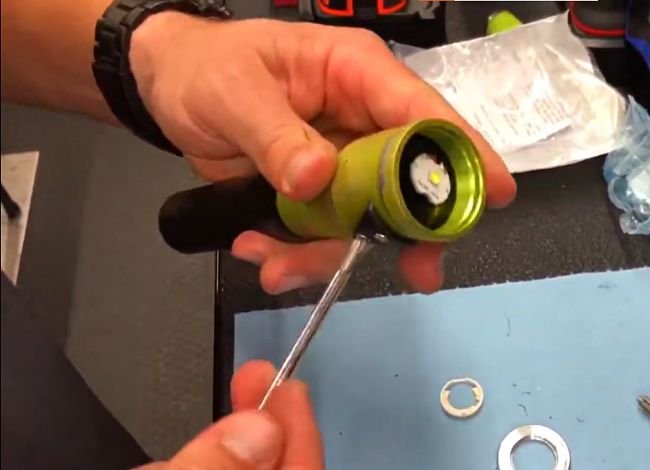
Common signs of a faulty switch include:
- The flashlight only works when you press the button repeatedly.
- The button feels stuck, loose, or unusually stiff.
- The light flickers when the switch is touched.
- The flashlight won’t turn off or change modes correctly.
Tools You May Need
- Soft cleaning brush
- Clean, lint-free cloth
- Small screwdriver, if permitted by the model’s service instructions
- Manufacturer-approved replacement switch, if user-replaceable
Step-by-Step Guide to Check the Power Switch
Step 1: Turn Off the Flashlight
Disconnect the charger and remove the battery if your model allows it. Never inspect or disassemble a switch while the flashlight is connected to charging power.
Step 2: Inspect the Button
Look for dirt, visible damage, or anything preventing the button from moving normally.
Step 3: Clean Around the Switch
Use a soft, dry brush to remove dirt around the external button. Don’t pour cleaning liquid into the switch housing.
Step 4: Check the Tail Cap
If your flashlight has a removable tail cap, make sure it is properly installed and that the accessible contacts are clean.
Step 5: Test With a Working Battery
Reinstall an approved battery and test the switch using the operating instructions for your model.
Step 6: Check for Programming Issues
If the light turns on but doesn’t behave as expected, verify its operating mode before replacing any parts.
Step 7: Identify Whether the Switch Is Replaceable
Some Streamlight switches or tail-cap assemblies can be replaced. Others require specialized tools or factory service.
Step 8: Arrange Repair if Necessary
If the switch remains unresponsive, contact Streamlight or an authorized repair center. Avoid opening sealed components without model-specific service instructions. Doing so may damage the flashlight or affect its warranty and water-resistance rating.
For general switch problems, our push-button flashlight repair guide covers additional checks that may help identify a faulty button or electrical connection.
Why Is My Streamlight Flashlight Dim or Flickering?
A Streamlight flashlight that turns on but produces weak or flickering light may not have a serious internal problem.
Start by checking the battery charge and cleaning the accessible contacts. Make sure the tail cap is secure and the battery is installed correctly.
Also, remember that some high-output flashlights automatically reduce brightness to manage heat or battery power. That behavior doesn’t necessarily mean the flashlight is defective.
If the beam remains weak with a known-good battery, inspect the lens for dirt and check for signs of damage.
For more detailed troubleshooting, read our guide on why a flashlight grows dim and how to fix it.
When Should You Contact Streamlight for Repair?
Not every flashlight problem should be repaired at home.
If you suspect a damaged circuit board, sealed switch assembly, charging electronics, or internal LED failure, professional service is often the better option.
Streamlight offers a limited lifetime warranty on many products, subject to exclusions. Rechargeable batteries, chargers, switches, and electronics generally have separate two-year warranty coverage with proof of purchase. Specific terms depend on the product.
Before paying for repairs, check Streamlight’s official service and warranty options. You may be able to arrange factory service or locate an authorized repair center.
Frequently Asked Questions
How long does a Streamlight flashlight last on a full charge?
Runtime varies widely depending on the model, brightness setting, battery capacity, and operating conditions. High-output settings generally drain the battery faster than low modes. Check the specifications for your exact flashlight rather than relying on a single runtime estimate.
Can I replace the Streamlight battery myself?
Yes, many Streamlight flashlights have user-replaceable batteries. However, some models contain integrated or specialized battery packs. Always follow the product manual and use the specified replacement battery.
Why does my Streamlight flashlight keep shutting off?
A weak battery, loose contact, faulty switch, or internal electrical problem can cause unexpected shutdowns. Some models also adjust their output automatically to control temperature. Check the battery and contacts first, then review your model’s operating instructions.
Are Streamlight flashlights waterproof?
Water resistance depends on the model’s IP rating. For example, IPX4 indicates splash resistance, while IPX7 indicates protection against temporary immersion under specified test conditions.
Not every model provides the same protection. Our guide on whether Streamlight flashlights are waterproof explains the ratings and what they mean for everyday use.
Where can I get replacement parts for a Streamlight flashlight?
Visit the official Streamlight website for product information, authorized distributors, available replacement parts, and repair assistance.
Final Thoughts
Streamlight flashlights are built for demanding use, but occasional problems can still happen. Learning how to fix a Streamlight flashlight starts with identifying the cause rather than immediately replacing parts.
Check the battery, charging equipment, contacts, and switch first. These simple checks can often explain why a flashlight isn’t charging, turning on, or producing its normal brightness.
If the problem involves sealed electronics or internal components, don’t force the flashlight apart. Contact Streamlight or an authorized repair center to find out whether professional repair is available.
With proper battery care, regular cleaning, and the right maintenance, you can keep your Streamlight flashlight working reliably for years.
I was just given a streamlight #91830. it does not seem to be charging. is there suppose to be a light that goes on when it is on the charger? i guess if so, then it would imply the charger as the problem?
Hi there — congratulations on the new Streamlight #91830! Regarding your charger: yes, most Streamlight chargers do have a small status light (typically red/green) that indicates when the battery is connected properly and charging. If the light never comes on, that does suggest the charger or the connection might be faulty.
Here are a few steps to troubleshoot:
I have a Fire Department issued survivor Light Led is not working. I believe it may need a new “ bulb”. Please tell me where I should ship it and what estimate would be?
The Streamlight Survivor uses an integrated LED module, not a traditional replaceable bulb. In most cases, when the LED stops working, Streamlight recommends factory service rather than DIY replacement.
We don’t accept repairs or shipments, but the good news is that Streamlight offers excellent warranty and repair support, especially for fire department–issued lights.
What to do next:
Contact Streamlight Customer Service directly
???? https://www.streamlight.com/support
Explain that you have a Fire Department–issued Streamlight Survivor with a non-working LED
They’ll provide:
Shipping instructions
Repair or replacement options
Cost estimate (many repairs are free or low-cost if under warranty)
If you want, you can also share:
The exact model number
Whether the light was exposed to heat, water, or impact
That helps them diagnose it faster.
Hope this points you in the right direction
I recently purchased 3 Streamlight 66210 flashlights. None of them will turn on even after fully charging the batteries. I have checked the connections and battery orientation but no progress. Please help me find a solution before i have to return them to Cabela’s.
Thanks for the details — if all 3 brand-new Streamlight 66210s won’t power on, it’s usually one of a few simple “setup” issues (or a bad batch). Here’s the fastest checklist before you return them:
Remove any shipping insulator
Some lights ship with a thin plastic tab/disc blocking the battery contact. Pull the battery back out and look for any plastic film/tabs near the contacts.
Confirm the correct battery type
Make sure you’re using the exact battery model Streamlight specifies for the 66210 (and not a “similar-looking” rechargeable). If you have another known-good battery of the same type, test with that too.
Try a hard “reset”
Unscrew the tailcap (or head) fully, remove the battery for 60 seconds, then reinstall.
Re-tighten firmly (finger-tight + a bit more). Some lights won’t turn on if the tailcap isn’t fully seated.
Clean the contacts (even on new lights)
Wipe the battery ends and the light’s metal contacts/springs with a dry cloth.
If you see any oil/residue, use a tiny amount of isopropyl alcohol on a cotton swab, let it dry, then retry.
If it still won’t power on
Since they’re new and none of the three work, I’d honestly exchange/return to Cabela’s first (fastest solution).
Otherwise, Streamlight’s service/warranty route is here:
If you tell me what battery/charger you’re using (battery model number + how you’re charging), I can narrow it down to the most likely cause in one reply.
I have a Streamlight Ulterstinger LED S/N 061639 0219. The light will not stay on in high power mode when pushing the button. If I cycle to a lower mode the light will work well. Any ideas on the fix? Thanks
Hi Tim, if your UltraStinger LED works on a lower mode but will not stay on in high mode, the first thing I would suspect is a weak battery pack or charging issue. High mode pulls much more power, so an aging battery can fail under load even if the light still works on low.
I would check that the charger is working correctly, clean the battery and charger contacts, and make sure the battery is fully seated. If the battery is a few years old, replacing the correct Streamlight battery pack would be the next step before assuming the switch or LED driver is bad.