Last Updated on November 11, 2026
When it comes to choosing a flashlight for camping, hiking, emergency use, or tactical applications, finding one that balances brightness, durability, runtime, and portability can feel overwhelming. In this Klarus G20 Review, I’ll walk you through everything you need to know about a compact, high-output flashlight with two independent switches.
The Klarus G20 flashlight stands out from the crowded market with its impressive 3000-lumen output, short body, low-mode runtime, and sturdy build. I’ll cover its lighting modes, how the switches work, what to expect from charging, and how its beam compares with the Olight R50 Seeker.
Klarus G20 Review — First Impressions & Key Features
At first glance, the Klarus G20 immediately gives off a premium and tactical vibe. It has a broad head, a textured grip and two buttons you can reach from different holds. The real appeal is the wide beam in a flashlight only 124 mm long. It makes sense for lighting a campsite, a room during an outage, or the area around a vehicle.
The trade-off is the body width. The 26650 cell gives you plenty of capacity, but it also makes the G20 feel thicker than a slim pocket flashlight. The holster is worth using when your pockets are already full. If you’re choosing it for one particular job, compare the mode you’ll actually use with the size and charging setup you want to carry.
Technical Features of the Klarus G20 flashlight
| Features | Klarus G20 rechargeable flashlight |
|---|---|
| Maximum Brightness: | 3000 lumens |
| Minimum Brightness: | 15 Lumens |
| Maximum Run-time: | 150 hours (15 lumens) |
| Minimum Run-time: | 45 minutes on Turbo, including reduced output |
| Beam Distance: | 150 meters |
| Lighting Modes: | 4 (15, 160, 650, 3000 lm) |
| Flashing Modes: | 2 (160, 3000 lm) |
| Switch: | 2 (side switch and tail switch) |
| Battery includes: | One 5,000 mAh 26650 rechargeable Li-ion battery included |
| LED: | CREE XHP70 N4 |
| Body: | Aerospace Aluminum Alloy |
| Waterproof standard: | IPX8 (2 m under rated test conditions); 1 m impact resistance |
| Length: | 124 mm |
| Weight: | 131 g without battery |
| Warranty: | Original manual describes five years of free repair for qualifying issues, followed by limited paid service |
| G20 photo and G15 link |
Pictured: Klarus G20. The photo opens the Klarus G15, a separate model with USB-C charging and a 5,000 mAh 21700 cell. The USB-C G15 is rated for up to 4,200 lumens and 200 meters. |
 Check Today’s Price On Amazon
Powerful Illumination
The Klarus G20 is rated for up to 3,000 lumens on Turbo. Its textured reflector spreads light around the center of the beam, which is handy when you want to see the ground in front of you and still see the sides of a path. Around camp, that beam is useful for finding dropped gear or checking the area around a tent.
Turbo is best used in bursts. At close range, try Medium first. A white wall, reflective road sign or the underside of a light-colored hood can bounce a lot of light back at you. For a brief look across a yard or to pick out an object past the edge of the campsite, move up to High or Turbo as needed.
Long Battery Life with 5000mAh Capacity
The 5,000 mAh 26650 rechargeable battery is what gives the Klarus G20 its rated 150 hours on Low at 15 lumens. Klarus lists about 45 minutes on Turbo. That is a runtime for the mode, with output reduced as the light heats up. It should not be read as 45 minutes at a steady 3,000 lumens.
For an evening walk, compare the 19-hour Medium rating with the 4-hour-30-minute High rating. Medium can give you enough light for the path and leave more battery for the next outing. Cold weather, an older battery and airflow around the light can change how it behaves. For an outage kit, test the light on Medium before relying on the Low-mode figure to decide how often to recharge.
Durable Aerospace Aluminum Build
The G20 uses 6061-T6 aluminum alloy with a hard-anodized finish. Its hardened mineral glass lens has an anti-reflective coating. Use the holster when you carry the light with tools so the lens and charging-port cover are less likely to rub against metal edges.
Waterproof and Impact-Resistant
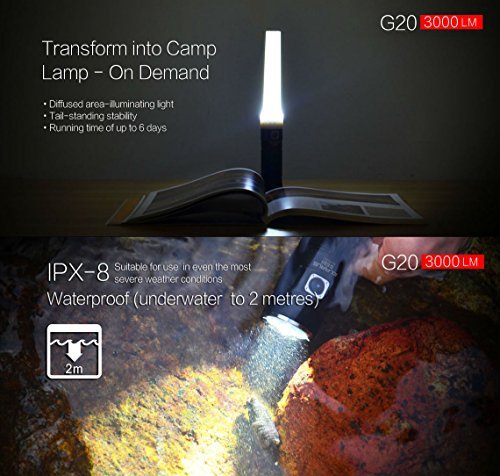
Klarus rates the G20 IPX8 at up to 2 meters and lists 1-meter impact resistance. Those are test ratings. In everyday use, check that the charging-port cover is seated and the body is fully tightened before taking the light into the rain.
Advanced LED Technology
The Cree XHP70 N4 LED sits behind an orange-peel reflector. That lightly textured reflector helps soften the edge of the bright center and blend it into the surrounding spill. The result is easier to use across a work area than a tight beam that puts most of its light in a small spot. The original G20 uses this LED and the 26650 cell described above. The G20L and G15 are separate models.
Klarus G20 Review — Lighting Modes, Controls, and User Experience
One of the most practical aspects of any flashlight is how easy it is to use. The Klarus G20 excels in this area, offering a user-friendly interface combined with multiple lighting options to suit various scenarios. In this section of the Klarus G20 Review, we’ll break down the lighting modes, control mechanisms, and overall usability.
Multiple Lighting Modes for Every Situation
The Klarus G20 comes equipped with four standard brightness levels and two special modes. This range of lighting options ensures that users can adjust the brightness depending on the task at hand, whether conserving battery life or maximizing illumination.
Here’s a closer look at the Klarus G20’s lighting modes:
- Low Mode (15 lumens):
Runtime: up to 150 hours
Perfect for reading, close-up work, or conserving battery life during extended trips. - Medium Mode (160 lumens):
Runtime: approximately 19 hours
Ideal for walking at night or indoor use during power outages. - High Mode (650 lumens):
Runtime: around 4.5 hours
Provides excellent illumination for outdoor work or searching larger areas. - Turbo Mode (3000 lumens):
Runtime: about 45 minutes
Use it for a quick scan across a yard or other open area. Output can drop during the rated runtime. - Strobe Mode (3000 lumens):
A fast flashing mode rated for about 1 hour 30 minutes. Avoid pointing it at anyone’s eyes. - SOS Mode:
Flashes the SOS pattern at a rated 160 lumens for up to 51 hours.
Low is a good place to start indoors or when looking into a bag. Medium is easier on the battery than High when you need light for a whole evening.
Dual-Switch System for Easy Operation
Both buttons on the Klarus G20 can turn the light on or off and change output. Which one you press matters most when the flashlight is off.
- Start on Low: From off, click the tail switch once.
- Recall a steady mode: From off, click the side switch. It recalls the previous steady level and skips Strobe and SOS.
- Change brightness: With the light on, click either switch to cycle through Low, Medium, High and Turbo. Hold a switch for about a second to turn the light off.
- Momentary Turbo: From off, hold either switch. Release it to leave Turbo.
- Flashing modes: Double-click either unlocked switch for Strobe, then double-click again for SOS. A single click exits the flashing mode.
The tail switch is useful when you want predictable low light without thinking about which mode you used last. The side button is convenient if you usually work at Medium and want to pick up where you left off. If you carry the light at night, practice using both buttons by feel before your first outing.
Pictured: Klarus G20. The photo opens the USB-C Klarus G15. The G15 uses a side switch and a 21700 battery, so the G20’s tail-switch instructions do not apply to it.
 Check Price
Lock-Out Mode for Safe Transport
Hold both switches for two seconds to lock the G20. Three quick clicks of either switch unlock it. The main light blinks twice on entry or exit. If a single press only makes the side indicator blink three times, unlock the light before assuming the battery has run down.
Battery Capacity Indicator
The side indicator shows the battery level for about five seconds when the light is switched on. Green means roughly 70–100%, orange means 30–70%, and red means below about 30%. Below 10%, the red indicator flashes and the main light gives a periodic warning. Check the indicator at startup before packing the light for a long trip.
Reverse Polarity Protection
Reverse-polarity protection helps if the battery is inserted backward. Check the polarity markings when reinstalling the cell, and make sure the cap seats properly before testing the light.
Integrated Micro-USB Charging
The Klarus G20 has a Micro-USB charging port on the light. You can top up the installed battery from a USB power source with the correct cable. If you keep the light in an emergency kit, store a Micro-USB cable with it. A USB-C cable for your phone won’t fit.
Related: Klarus Mi7 Review: Small LED 700 Lumens Flashlight
Klarus G20 Review — Build Quality, Durability, and Outdoor Performance
The G20’s construction matters when you’re holding it with damp hands, taking it out in rain or carrying it with tools.
Built Tough with Aerospace-Grade Aluminum
The Klarus G20 is engineered with durability in mind. It features a body made from 6061-T6 aerospace aluminum alloy, known for its high strength, corrosion resistance, and lightweight nature. The hard-anodized finish helps protect the body from ordinary wear.
The textured grip makes the light easier to hold when changing modes one-handed. The raised side button is easier to find if you line it up with your thumb before you start walking.
Scratch-Resistant Lens with AR Coating
The hardened mineral glass lens has an anti-reflective coating. Brush away grit before wiping the glass. Rubbing a dirty lens can scratch the surface even when the glass is hardened.
IPX8 Waterproof Rating for Harsh Conditions
The Klarus G20 is rated IPX8 at 2 meters. Keep the charging cover closed, wipe the light dry before opening it, and inspect the O-ring if the light has been stored for a long time. IPX8 is a water rating and does not specify a dust rating.
Impact Resistance for Tactical and Outdoor Use
The 1-meter impact rating gives a useful reference for accidental drops. After a hard drop, check the lens and charging cover, then test Low and High before depending on the light again. If it flickers, check whether the body or tail cap loosened.
Compact and Lightweight for Easy Portability
Despite its powerful performance, the Klarus G20 remains incredibly compact and easy to carry. Measuring just 124 mm in length and weighing 131 grams (without battery), it fits comfortably in your pocket, backpack, or tool kit. The included holster and lanyard make it even more convenient to attach to your belt or carry around your wrist.
Pictured: Klarus G20. The photo opens the Klarus G15, a slimmer model with USB-C charging and a 21700 cell.
At 34 mm across the body and 36 mm at the head, the G20 is short but fairly thick. If you carry it all day, the holster may be more comfortable than a trouser pocket. The 131 g figure is for the light without the cell.
Reliable Outdoor Performance
The Klarus G20 has a rated beam distance of 150 meters. At that range the beam only just meets the test threshold. A trail marker may reflect enough light to stand out, while a dark obstacle is harder to make out much closer. The broad spill is the reason to choose this beam for a campsite or yard. For checking a far treeline, a more focused reflector can be a better fit.
Our guide to flood and throw beams explains why a flashlight with fewer lumens can still reach farther. For a Klarus example, the XT12GT and XT12GT Pro comparison shows how a long-throw light serves a different job.
Advanced Features That Enhance Performance
The G20 has several protections worth knowing about before carrying it on a trip.
1️⃣ Smart ITS Temperature Control System
The Klarus G20 features an Intelligent Temperature System (ITS) that automatically monitors the internal temperature and adjusts brightness levels to prevent overheating. The housing can still become hot. If you need light for a task that takes several minutes, start with High or Medium and save Turbo for short checks.
2️⃣ Reverse Polarity Protection
Sometimes users insert batteries incorrectly by mistake. The G20 is designed with reverse polarity protection, which helps protect the circuit if the cell is inserted backward.
3️⃣ Lock-Out Mode
The lock-out mode helps avoid accidental activation inside bags or pockets. Lock it before putting it in a pocket with other gear. For long storage, remove the battery.
4️⃣ Battery Level Indicator
A brief glance at the battery capacity indicator on startup can tell you whether it’s worth charging before you leave.
Klarus G20 Charging System: Convenient and Easy
The Klarus G20 supports integrated micro-USB charging, allowing you to recharge the flashlight without removing the battery. You can easily connect it to:
- Wall chargers
- Car adapters
- Power banks
- Laptops or PCs
The G20 manual gives about four hours with the specified Klarus 2 A charging setup and 26650 cell. A low-current port or a worn cable can take longer. Switch the light off, uncover the port and insert the Micro-USB plug gently. Once charging is complete, unplug the cable and reseat the cover. Avoid forcing a plug that does not fit.
Battery compatibility: Use the supplied Klarus 26650 or a compatible 26650 Li-ion cell approved for the G20. The manual excludes 18650, 16340 and CR123A cells. A different flashlight with the same rated battery capacity can still require a different cell size or contact layout.
What to Check If the Klarus G20 Won’t Turn On or Charge
Start with the tail switch from off. If the side indicator flashes three times and the beam stays off, unlock the switches. If there is no response, switch off, check that the battery is fitted in the correct direction and retighten the body. For charging, try a known-good Micro-USB cable and USB power source. Stop if the cell is damaged, the port feels loose, or a connector or cable becomes unusually hot.
If Turbo drops after a short burst, give the light time to cool and check the charge before assuming it has a fault. If Medium still cuts out with a charged compatible battery, inspect the accessible contacts and cap. The checks in this push-button flashlight troubleshooting guide can help narrow down the cause. Keep the sealed switch housing intact.
Klarus G20 Accessories Included in the Box
The original G20 manual lists these accessories:
- Klarus 26650 Rechargeable Battery (5000 mAh)
- USB Charging Cable
- Lanyard
- Holster
- Spare O-ring
Charge the battery before first use. If you use the lanyard, check its attachment before working near water or above a hard surface.
Klarus G20 vs. Olight R50 — Head-to-Head Comparison
Many buyers compare the Klarus G20 with the Olight R50 Seeker. Both use a 26650 battery and charge through Micro-USB, but they differ in beam reach and switch layout. These figures are for the original R50 Seeker.
| Features | Klarus G20 Flashlight | Olight R50 Flashlight |
|---|---|---|
| Pictured and linked models |
Pictured: Klarus G20. The photo opens the USB-C Klarus G15, rated at up to 4,200 lumens and 200 meters with a 21700 cell.
|
Pictured: Olight R50 Seeker. The photo opens the black Olight i3E EOS, a twist-operated keychain light rated for 90 lumens and 44 meters on one AAA cell.
|
| Maximum Brightness: | 3000 lumens | 2500 lumens |
| Minimum Brightness: | 15 lumens | 50 lumens |
| Beam Distance: | 150 Meters | 297 Meters |
| Maximum Run-time: | 150 hours (15 lumens) | 50 hour (50 lumens) |
| Minimum Run-time: | 45 minutes on Turbo, including reduced output | 2 minutes at 2,500 lumens, then about 150 minutes at 800 lumens |
| Modes: | 4 (15,160,650,3000 lm) | 4 (50,300,1200,2500 lm) |
| LED: | CREE XHP70 N4 | CREE XHP50 |
| Battery Include: | Yes (26650) | Yes (customized 26650) |
| Length: | 124 mm | 133 mm |
| Weight: | 131 grams(w/o battery) | 255 g including battery |
| Linked models | Klarus G15 Check Price |
Olight i3E EOS Check Price |


Summary of Comparison
- The Klarus G20 has the higher peak rating and a 15-lumen Low rated for 150 hours. The R50 Seeker’s Low is brighter at 50 lumens and rated for 50 hours. Those runtimes are measured at different output levels.
- The Olight R50 offers a longer beam distance, which may benefit users who need long-distance throw.
- The Klarus G20 is shorter and narrower at the head. The listed weights use different conditions: the G20 figure excludes the battery and the R50 figure includes it.
The G20 gives you a lower minimum output and a tail button you can find by feel. The R50 Seeker has a side-only switch and a higher distance rating. When comparing used lights, check which cable and cell come with each. The R50 Seeker uses a customized 26650, so sharing the same battery size does not establish interchangeability.
Final Thoughts
The Klarus G20 combines a wide beam with a short body and two switches. Its 15-lumen Low, 160-lumen Medium and 650-lumen High are the settings you’ll probably use most. The 3,000-lumen peak is useful when you need a brief burst across an open area.
For a weekend camping trip or emergency kit, the wide spill and easy tail-switch start on Low are practical. Pack the correct Micro-USB cable and test the 26650 before leaving. If your other gear uses USB-C or you prefer a narrow pocket light, those differences are worth weighing before choosing the G20.
Who Should Buy the Klarus G20?
- ✅ Campers and Hikers: Useful for a broad view around camp and for walking at a moderate brightness.
- ✅ Emergency Responders: Useful as an area light for nearby work. For distance work, compare beam reach and sustained output.
- ✅ Homeowners: Great for power outages, nighttime security, or general household use.
- ✅ Tactical and Law Enforcement Professionals: The tail button gives predictable access to Low. Consider whether the short, wide body fits your carry setup.
The G20 makes the most sense when you want a handheld flood beam, a separate tail control and long runtime at modest brightness.
Frequently Asked Questions — Klarus G20 Review
1️⃣ What are the key features of the Klarus G20 flashlight?
The Klarus G20 features 3000 lumens brightness, CREE XHP70 N4 LED, 5000mAh 26650 rechargeable battery, dual-switch operation, IPX8 waterproof rating, multiple lighting modes (including SOS & Strobe), USB charging, and a compact 124mm length design for easy portability.
2️⃣ How long does the Klarus G20 battery last on a full charge?
The battery life depends on the brightness mode:
- Turbo Mode (3000 lumens): ~45 minutes
- High Mode (650 lumens): ~4.5 hours
- Medium Mode (160 lumens): ~19 hours
- Low Mode (15 lumens): ~150 hours
The ratings use a 5,000 mAh 26650 lithium-ion battery. The Turbo figure includes time after the light reduces its output.
3️⃣ Is the Klarus G20 flashlight waterproof and impact-resistant?
Klarus lists IPX8 water resistance at 2 meters and 1-meter impact resistance under its rated test conditions. Check the port cover and seals before wet use.
4️⃣ How do you charge the Klarus G20?
The Klarus G20 supports micro-USB charging directly, so you don’t need to remove the battery. Allow about four hours with the specified Klarus 2 A setup. Other power sources can take longer. Once charging is complete, close the port cover.
5️⃣ What lighting modes does the Klarus G20 offer?
The Klarus G20 includes:
- Turbo (3000 lumens) – 45 minutes
- High (650 lumens) – 4.5 hours
- Medium (160 lumens) – 19 hours
- Low (15 lumens) – 150 hours
- Strobe (3000 lumens) – Rapid flashing mode
- SOS Mode (160 lumens) – Emergency signaling
6️⃣ Can I use other battery types with Klarus G20?
Use a compatible 26650 rechargeable Li-ion battery. The supplied cell was rated at 5,000 mAh. The manual rules out 18650, 16340 and CR123A cells for the G20.
Klarus G20 Review — The Bottom Line
The Klarus G20 is a short, wide-beam flashlight that suits close and medium distances. Its independent switches let you start on Low from the tail or recall a steady setting from the side. If you mainly need a light for camp, a yard, or short inspections, that combination is the strongest reason to choose it. The 150-meter beam rating, Micro-USB port and 26650 battery are the trade-offs to keep in mind.
Fenix lights from Fenix store are far better than any other brands. I’ve been using Fenix for years and their products are indeed well built and portable.