Last Updated on November 4, 2026
If you use a flashlight regularly, replacing disposable AA or AAA batteries can become expensive and inconvenient. A USB rechargeable flashlight makes more sense for frequent use. The Fenix UC30 is one such option, offering a maximum output of 1000 lumens, a 253-meter beam distance, and five brightness settings in a compact aluminum body.
In this Fenix UC30 review, we’ll look at its brightness, battery life, charging system, durability, and everyday performance. We’ll also compare it with the Fenix PD35 and UC35 to help you understand the differences.
This Fenix UC30 review covers the upgraded 1000-lumen model introduced in 2017. The earlier 960-lumen version has different specifications, so match the controls and output information to the light you own. Our Fenix flashlight reviews also cover other sizes and control layouts.
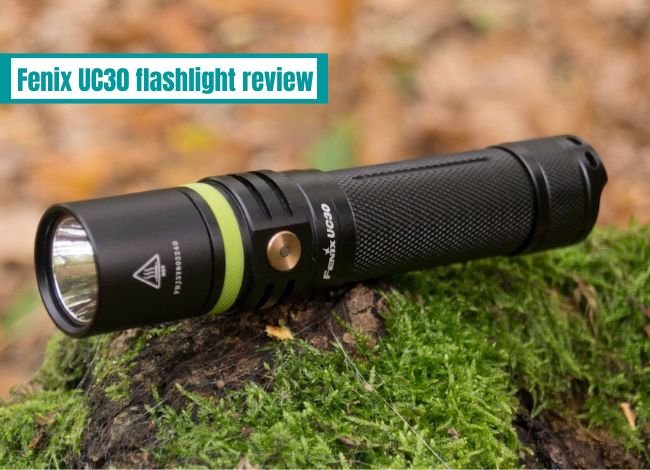
Technical Features of the Fenix UC30 Flashlight
| Fenix UC30 | 1000-Lumen Model Specifications |
|---|---|
| Maximum Brightness | 1000 lumens |
| Minimum Brightness | 5 lumens |
| Maximum Runtime | 150 hours (Eco mode) |
| Turbo Runtime | 1 hour 25 minutes (rated total runtime, including step-down) |
| Maximum Beam Distance | 253 meters (830 feet) |
| Brightness Modes | 5 levels plus Strobe |
| LED | Cree XP-L HI V3 |
| Battery | One 18650 rechargeable Li-ion or two CR123A batteries |
| Charging | Built-in Micro-USB charging for the compatible rechargeable 18650 battery |
| Body Material | Aircraft-grade aluminum |
| Waterproof Rating | IP68, rated for submersion to 2 meters |
| Impact Resistance | 1 meter |
| Length | 130 mm (5.1 inches) |
| Head Diameter | 25.4 mm (1 inch) |
| Weight | 77 grams (2.7 oz), excluding battery |
Why Should You Consider the Fenix UC30 Flashlight?
The UC30 offers several practical features for outdoor use, emergencies, and everyday tasks.
- Maximum brightness of 1000 lumens
- 253-meter rated beam distance
- Micro-USB charging without removing the rechargeable battery
- Five brightness levels and a Strobe mode
- Battery level indicator and low-voltage warning
- Reverse polarity and overheating protection
- Compact aluminum construction
- IP68 water and dust resistance
- Lockout function to prevent accidental activation
Although newer flashlights may offer faster USB-C charging, the UC30 still has a useful combination of brightness, portability, and simple operation.
How to Use the Fenix UC30 Side Switch
Press and hold the side switch for more than half a second to turn the light on or off. With it on, single-click to cycle through Turbo, Eco, Low, Medium, and High. The light recalls the last selected steady output, so a bright start can simply mean it was last used on Turbo.
Hold the side switch for about 1.2 seconds to activate strobe; one more click returns to the previous steady output. For lockout, double-click within half a second. Two brief blinks indicate a locked light. Repeat the rapid double-click to unlock; the UC30 returns to its last brightness setting.
Use lockout before placing the light in a pocket or bag. For longer storage, remove the battery. Lockout prevents normal switch activation, but it is not a substitute for checking an aging battery or damaged contacts.
Fenix UC30 Brightness Levels and Runtime
One feature I always check before buying a flashlight is how long it can run at different brightness settings. The UC30 offers five levels, so you don’t have to use maximum power for every task.
| Lighting Mode | Brightness | Rated Runtime | Beam Distance |
|---|---|---|---|
| Eco | 5 lumens | 150 hours | 21 meters |
| Low | 50 lumens | 28 hours 25 minutes | 58 meters |
| Medium | 150 lumens | 8 hours 45 minutes | 101 meters |
| High | 350 lumens | 3 hours 20 minutes | 156 meters |
| Turbo | 1000 lumens | 1 hour 25 minutes* | 253 meters |
| Strobe | 1000 lumens | Not specified | Not specified |
*The manufacturer states that Turbo automatically steps down to High after approximately three minutes to control heat. The published runtime includes this protective behavior and does not mean the flashlight maintains 1000 lumens continuously. Figures were laboratory-tested using a Fenix ARB-L18-2600 battery.
1000-Lumen USB Rechargeable Fenix UC30 Flashlight Review
The Fenix UC30 is a sturdy rechargeable flashlight with features that make it suitable for different situations. Its built-in charging port is especially convenient because you can recharge the 18650 battery without removing it from the flashlight.
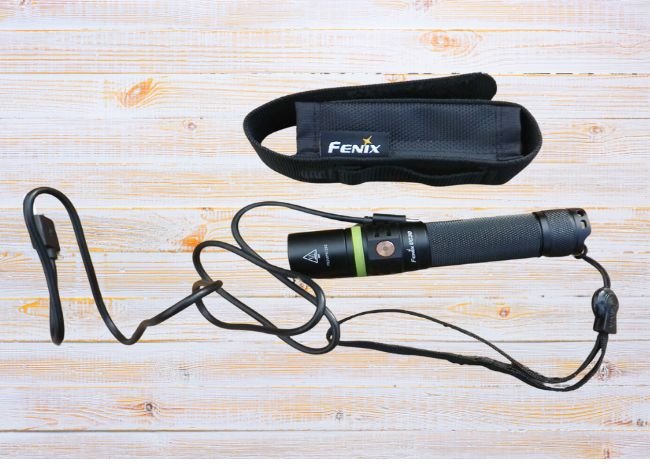
The standard upgraded package includes a rechargeable 18650 battery, holster, lanyard, spare O-ring, Micro-USB cable, and replacement rubber covers. Seller bundles can differ, so distinguish the flashlight’s own features from added accessories.
For camping, walking the dog, or checking something outside at night, the UC30 offers useful lighting choices. Its side-switch operation is straightforward once you’re familiar with the different modes. A lower setting is often the most comfortable place to start for nearby tasks.
Key Features of the Fenix UC30 Rechargeable Flashlight
1. Quality Aluminum Construction
Fenix is known for producing well-built flashlights, and the UC30 follows that approach. Its aircraft-grade aluminum body has a Type III hard-anodized finish that helps resist scratches and everyday wear.
The flashlight is also rated to withstand a one-meter impact. This provides some protection against accidental drops, although it does not guarantee that the flashlight will survive every fall.
Its toughened glass lens has an anti-reflective coating, helping the LED produce a clear beam.

2. Powerful 1000-Lumen Illumination
When I look for a quality flashlight, brightness is one of the first things I consider. The UC30 produces up to 1000 lumens with its Cree XP-L HI V3 LED and has a maximum rated beam distance of 253 meters.
That is useful when checking a dark backyard, looking farther down a trail, or inspecting an outdoor area. However, the rated beam distance does not mean you can clearly identify every object at 253 meters.
For close-range tasks, the lower brightness levels are often more comfortable and save battery power.
3. Five Brightness Modes and Strobe
I prefer a flashlight that offers different lighting options rather than just one powerful setting. The UC30 has Eco, Low, Medium, High, and Turbo modes.
Eco works well for reading or locating items nearby. Medium and High provide useful illumination for general activities, while Turbo gives you a short burst of maximum brightness.
There is also a Strobe mode for attention-getting signals. It should not be treated as a substitute for proper emergency communication or personal safety equipment.
4. Cree XP-L HI V3 LED
The upgraded UC30 uses a Cree XP-L HI V3 LED, replacing the older version’s LED configuration. Fenix states that this LED has a rated lifespan of approximately 50,000 hours.
That doesn’t mean the entire flashlight is guaranteed to operate for 50,000 hours. Battery condition, electronics, switches, and charging components also affect overall service life.
5. Battery Level Indicator
One useful feature is the battery level indicator built into the side switch. With the light off and unlocked, one short click displays the approximate battery status for three seconds: steady green for high charge, flashing green for sufficient charge, steady red for low charge, and flashing red for critically low charge.
When the battery voltage becomes low, the indicator can flash red. The flashlight also steps down as voltage falls, helping extend usable light at lower output.
The voltage-based warning and automatic low-voltage behavior are designed for the compatible rechargeable 18650 battery.
6. Convenient Micro-USB Charging
The UC30 charges its compatible 18650 battery through a Micro-USB port. You don’t need a separate charger for normal charging, although an external charger may be useful for a spare cell. Use a manufacturer-approved battery that fits correctly; a higher capacity figure alone does not establish compatibility.
The charging indicator displays red during charging and green when charging is complete. The original 2600mAh battery takes approximately three hours to charge under the manufacturer’s stated conditions.
Charge with the flashlight switched off, then disconnect the cable and close the rubber USB port cover. Only Low output is available while charging, and using it extends charging time. Never connect the charging cable with disposable CR123A batteries installed. Do not substitute rechargeable 16340/RCR123 cells for the specified 3V primary CR123A batteries.
7. Included Accessories
The original retail package included a Fenix ARB-L18-2600 rechargeable battery, holster, lanyard, spare O-ring, Micro-USB charging cable, and two spare rubber covers.
A compatible replacement battery and intact port cover matter more for day-to-day ownership than extra bundle accessories. Keep the charging cable somewhere easy to find, especially if the rest of your equipment now uses USB-C.
If you’re comparing flashlights that use similar rechargeable cells, our 18650 flashlight buying guide covers other options.
Fenix UC30 Pros and Cons
Pros
- Bright 1000-lumen maximum output
- Useful five-level brightness selection
- Integrated Micro-USB charging
- Durable aluminum construction
- IP68 water and dust resistance
- Battery level indication
- Overheating and reverse polarity protection
- Compact enough for regular carrying
Cons
- Older Micro-USB charging rather than USB-C
- No dedicated tactical tail switch
- Can turn on accidentally without lockout
- Turbo output automatically decreases after approximately three minutes
Fenix UC30 vs. PD35 vs. UC35
The UC30, PD35, and UC35 share some design characteristics, but their switches and charging options differ. The three choices below identify the exact versions so that peak output and charging features stay matched to the right light.
| Fenix UC30 and Alternatives | Maximum output / reach | Charging and controls | Best fit |
|---|---|---|---|
| 1. PD35 V3.0 | 1700 lumens / 357 m | Charge the removable battery separately; tail power switch and side output switch | Longer reach and quick rear-switch activation |
2. UC35 V2.0 Check Fenix UC35 V2.0 Availability | 1000 lumens / 266 m | Built-in Micro-USB; tail power switch and side output switch | On-body charging with a tail switch |
| 3. UC30 (2017, 1000 lm) | 1000 lumens / 253 m | Built-in Micro-USB; side switch only | Shorter body and one control for all functions |
1. PD35 V3.0: choose it for more reach
The PD35 V3.0 delivers the strongest peak beam of these three. It is 134 mm long and uses a removable 18650 battery, but the flashlight itself has no charging socket. Charge a compatible cell in an external charger or through the battery’s own USB port if fitted. Its tail switch handles power and momentary light, while the side switch selects brightness.
That makes it a practical alternative for someone who values fast activation from the rear and a farther-reaching beam. It still needs lower settings for comfortable close work, and Turbo output reduces as protection takes effect. Our guide to the different PD35 versions explains why V2.0 and TAC specifications should not be applied to the V3.0.
2. UC35 V2.0: choose it for tail-switch control and built-in charging
The UC35 V2.0 combines Micro-USB charging with separate tail and side switches. Its 140 mm body is slightly longer than the UC30’s, and its 1-lumen Moonlight level is dimmer than the UC30’s 5-lumen Eco mode. That low setting can be useful in a tent or dark room.
If you want a tail switch along with rechargeable convenience, read our Fenix UC35 review. The UC35 V2.0 still needs a Micro-USB cable, so it does not solve a preference for USB-C. Choose it for its controls and low-light behavior rather than expecting a large jump in maximum brightness.
3. UC30: choose it for the shorter side-switch design
The UC30 is 130 mm long and weighs 77 g without its battery. Its side-only control is convenient when you naturally hold the body with your thumb near the head. Someone who prefers to activate a light from the rear may find the other two layouts easier.
There is no universal winner between the UC30 and UC35 V2.0: both offer built-in Micro-USB charging and a 1000-lumen peak. The main decision is how you want to hold the light and reach the switch. Our dedicated UC30 vs. UC35 comparison covers those handling differences in more detail.
Common Fenix UC30 Problems and Troubleshooting
| Problem | What to Check |
|---|---|
| Flashlight won’t turn on | Check battery orientation and charge level. Ensure the battery cap is securely tightened and the flashlight is not locked. |
| Light appears weak | Recharge the 18650 battery and check the selected brightness mode. |
| Light flickers | Inspect battery contacts and threaded connections for dirt or looseness. |
| Micro-USB charging fails | Use another compatible cable and power source. Inspect the port for moisture or damage. |
| Flashlight becomes hot | Switch to a lower setting and allow the body to cool. Automatic Turbo step-down is normal. |
| Side switch doesn’t respond | Check whether lockout mode is active. The manual describes unlocking with two rapid clicks of the side switch. |
| Water enters the flashlight | Stop using or charging it. Remove the battery when safe and have the flashlight inspected before reuse. |
Is the Fenix UC30 Still Worth Buying in 2026?
The Fenix UC30 remains a capable flashlight for camping, hiking, roadside emergencies, and general home use. Its 1000-lumen output, rechargeable battery, and compact design are still useful.
If you already own one, there is little reason to replace a properly working flashlight simply because newer models offer higher peak output. A healthy compatible battery, clean contacts, and an intact charging cover help keep it useful.
For a new purchase, compare the switch layout, size, charging connection, and useful output levels. USB-C can simplify your cable kit, but it does not by itself establish faster charging or better sustained brightness. Choose the features that solve your actual daily tasks.
Frequently Asked Questions (FAQs)
1. How long does the Fenix UC30 battery last on a full charge?
The manufacturer rates the upgraded UC30 for up to 150 hours on its 5-lumen Eco setting. Turbo has a rated total runtime of one hour 25 minutes, including automatic output reduction after about three minutes.
2. Is the Fenix UC30 flashlight waterproof?
Yes. The upgraded UC30 has an IP68 rating and is rated for submersion to two meters under specified test conditions. The USB port cover must be correctly closed.
3. Can I use AA or AAA batteries in the Fenix UC30?
No. It is designed for one compatible rechargeable 18650 Li-ion battery or two CR123A lithium batteries. Do not attempt to recharge disposable CR123A cells.
4. How bright is the Fenix UC30 flashlight?
The upgraded version produces up to 1000 lumens and has a maximum rated beam distance of 253 meters.
5. Does the Fenix UC30 have a Strobe mode?
Yes. It has five standard brightness levels plus Strobe. Holding the side switch for approximately 1.2 seconds activates Strobe.
6. Does the Fenix UC30 remember its brightness setting?
Yes. It recalls the last steady brightness used in General mode rather than strobe. Set a lower output before switching off if you want a gentler start indoors.
 Check Availability